Get certified for free when you join Fabric Data Days 2026 and dive into Fabric, Power BI, SQL, AI, and other essential data skills.
Join nowData Days is here! Join us now for 60+ days of learning, challenges, and connection. Learn more
I'm building out some sample data. I have a very simple data set that looks like this:
| Unit | Count | Spend | Month | Relative Month |
| Box | 1,234 | $100 | October | Current |
| Box | 5,678 | $801 | October | Current |
| Bag | 9,123 | $900 | September | Previous |
| Bag | 1,234 | $200 | September | Previous |
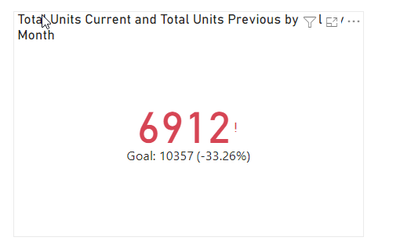
My hope is to create a simple KPI visual that shows the current month's performance (one visual for spend, one visual for count) and the +/- for the relative month. So, what I'd hope to see above is a large 6,912 representing units for the current month, then a Goal value of 10,327 (reprsenting prior month) and a % of -33% representing the difference between the current month and the prior month (goal).
I have built measures representing units for current and prior month, etc. Right now my field list looks like this:
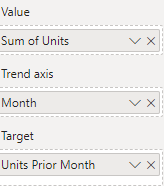
It just shows the prior month's value and the goal as the same number. I've also tried moving my Units Current Month measure to value and this just generates a Blank in the visual itself. Any thoughts?
Solved! Go to Solution.
Hi, @bensiqc ,
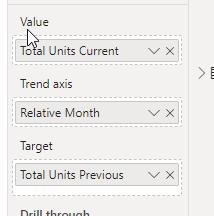
I tried something real quick:
Total Units Current =
CALCULATE(
[Total Units],
'KPI'[Relative Month] = "Current"
)Total Units Previous =
CALCULATE(
[Total Units],
'KPI'[Relative Month] = "Previous"
)Total Units = SUM('KPI'[Count])
Hi, @bensiqc ,
I tried something real quick:
Total Units Current =
CALCULATE(
[Total Units],
'KPI'[Relative Month] = "Current"
)Total Units Previous =
CALCULATE(
[Total Units],
'KPI'[Relative Month] = "Previous"
)Total Units = SUM('KPI'[Count])
Thanks! This works. Seems like my issue was that I didn't make an explicit Units measure and was instead using the 'sum of units' column in the dataset itself.
Don't miss out on Data Days, June 15 through August 7. Learn Fabric, Power BI, SQL, AI and more.
Check out the May 2026 Power BI update to learn about new features.
| User | Count |
|---|---|
| 23 | |
| 23 | |
| 21 | |
| 17 | |
| 13 |
| User | Count |
|---|---|
| 58 | |
| 51 | |
| 39 | |
| 29 | |
| 24 |