cancel
Showing results for 
Search instead for 
Did you mean: 

Learn from the best! Meet the four finalists headed to the FINALS of the Power BI Dataviz World Championships! Register now

Reply
bensiqc
Helper I
Helper I

KPI Visual - Simple Calculation

I'm building out some sample data. I have a very simple data set that looks like this:


UnitCountSpendMonthRelative Month
Box1,234$100OctoberCurrent
Box5,678$801OctoberCurrent
Bag9,123$900SeptemberPrevious
Bag1,234$200SeptemberPrevious


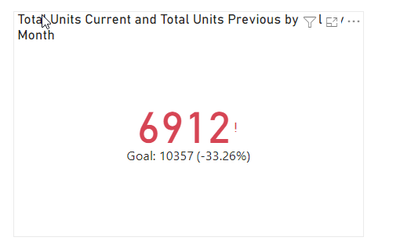
My hope is to create a simple KPI visual that shows the current month's performance (one visual for spend, one visual for count) and the +/- for the relative month. So, what I'd hope to see above is a large 6,912 representing units for the current month, then a Goal value of 10,327 (reprsenting prior month) and a % of -33% representing the difference between the current month and the prior month (goal).


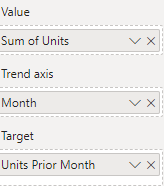
I have built measures representing units for current and prior month, etc. Right now my field list looks like this:


bensiqc_1-1668540112870.png


It just shows the prior month's value and the goal as the same number. I've also tried moving my Units Current Month measure to value and this just generates a Blank in the visual itself. Any thoughts?

1 ACCEPTED SOLUTION
vojtechsima
Super User
Super User

Hi, @bensiqc , 
I tried something real quick:


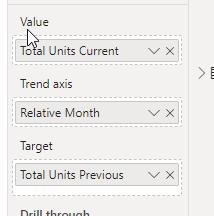
vojtechsima_0-1668544839835.pngvojtechsima_1-1668544845832.png


Total Units Current = 
CALCULATE(
    [Total Units],
    'KPI'[Relative Month] = "Current"
)
Total Units Previous = 
CALCULATE(
    [Total Units],
    'KPI'[Relative Month] = "Previous"
)
Total Units = SUM('KPI'[Count])


Any kudos or recognition appreciated. To learn more on the topic, check out my blog and follow me on LinkedIn.

View solution in original post

2 REPLIES 2
vojtechsima
Super User
Super User

Hi, @bensiqc , 
I tried something real quick:


vojtechsima_0-1668544839835.pngvojtechsima_1-1668544845832.png


Total Units Current = 
CALCULATE(
    [Total Units],
    'KPI'[Relative Month] = "Current"
)
Total Units Previous = 
CALCULATE(
    [Total Units],
    'KPI'[Relative Month] = "Previous"
)
Total Units = SUM('KPI'[Count])


Any kudos or recognition appreciated. To learn more on the topic, check out my blog and follow me on LinkedIn.

Thanks! This works. Seems like my issue was that I didn't make an explicit Units measure and was instead using the 'sum of units' column in the dataset itself.

Helpful resources

Announcements
Join our Fabric User Panel

Join our Fabric User Panel

Share feedback directly with Fabric product managers, participate in targeted research studies and influence the Fabric roadmap.

February Power BI Update Carousel

Power BI Monthly Update - February 2026

Check out the February 2026 Power BI update to learn about new features.

FabCon Atlanta 2026 carousel

FabCon Atlanta 2026

Join us at FabCon Atlanta, March 16-20, for the ultimate Fabric, Power BI, AI and SQL community-led event. Save $200 with code FABCOMM.