cancel
Showing results for 
Search instead for 
Did you mean: 

July 7 - July 17 | Round 2 of the Power BI Dataviz World Championships. Don't miss your chance! Learn more

Reply
CarlBlunck
Resolver I
Resolver I

KPI Target

Hi all,


I am using the KPI visual for the 1st time and I am wanting to add a calculated target, but I can't get it to work.


My dataset has a column that contains values (TimeToFill) like so (data not real):

DateMonthYearTimeToFill
1/01/2022Jan 202225.02
02/02/2022Jan 202228.32
01/03/2022Mar 202231.89
20/05/2022May 202218.29


The Value in the KPI visual is an average of the TimeToFill values.  With the Trend Axis being the MonthYear.


For the Target value, I have written the following expression:


TimeToFill-Target = 
VAR StartDate = EOMONTH(TODAY(),-14)+1
VAR EndDate = EOMONTH(TODAY(),-1)
VAR Result =
Calculate(
    AVERAGE(fact_PageUpReqData[TimeToFill-OfferAccepted]),
    DATESBETWEEN( fact_PageUpReqData[dim_FirstOfferAccepted.FirstOfferAccepted], StartDate, EndDate )
)
RETURN
Result


But this is giving me the same result as the KPI card.


What I am wanting the target to show, is the average TimeToFill over the last 13 months.  Not what it was for the last month as it is currently.
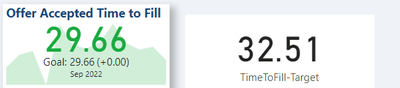
 

CarlBlunck_0-1666749483102.png


How do I achieve this?


Thanks

Carl

1 ACCEPTED SOLUTION
CarlBlunck
Resolver I
Resolver I

Solved it 🙂 needed to all the ALL function in.

TimeToFill-Target = 
VAR StartDate = EOMONTH(TODAY(),-14)+1
VAR EndDate = EOMONTH(TODAY(),-1)
VAR Result =
Calculate(
    AVERAGE(fact_PageUpReqData[TimeToFill-OfferAccepted]),
    DATESBETWEEN( fact_PageUpReqData[dim_FirstOfferAccepted.FirstOfferAccepted], StartDate, EndDate ),
    ALL(fact_PageUpReqData)
)
RETURN
Result


View solution in original post

1 REPLY 1
CarlBlunck
Resolver I
Resolver I

Solved it 🙂 needed to all the ALL function in.

TimeToFill-Target = 
VAR StartDate = EOMONTH(TODAY(),-14)+1
VAR EndDate = EOMONTH(TODAY(),-1)
VAR Result =
Calculate(
    AVERAGE(fact_PageUpReqData[TimeToFill-OfferAccepted]),
    DATESBETWEEN( fact_PageUpReqData[dim_FirstOfferAccepted.FirstOfferAccepted], StartDate, EndDate ),
    ALL(fact_PageUpReqData)
)
RETURN
Result


Helpful resources

Announcements
FabCon and SQLCon Barcelona 2026

FabCon & SQLCon – Barcelona 2026

Join us in Barcelona for FabCon and SQLCon, the Fabric, Power BI, SQL, and AI community event. Save €200 with code FABCMTY200.

60 days of Data Days Carousel

Data Days 2026

Join Fabric Data Days 2026: 60 days of free live/on-demand sessions, challenges, study groups, and certification opportunities.

Power BI DataViz World Championships carousel

Power BI DataViz World Championships - June 2026

A new Power BI DataViz World Championship is coming this June! Don't miss out on submitting your entry.