Learn from the best! Meet the four finalists headed to the FINALS of the Power BI Dataviz World Championships! Register now
Hi all,
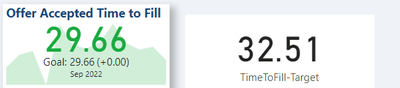
I am using the KPI visual for the 1st time and I am wanting to add a calculated target, but I can't get it to work.
My dataset has a column that contains values (TimeToFill) like so (data not real):
| Date | MonthYear | TimeToFill |
| 1/01/2022 | Jan 2022 | 25.02 |
| 02/02/2022 | Jan 2022 | 28.32 |
| 01/03/2022 | Mar 2022 | 31.89 |
| 20/05/2022 | May 2022 | 18.29 |
The Value in the KPI visual is an average of the TimeToFill values. With the Trend Axis being the MonthYear.
For the Target value, I have written the following expression:
TimeToFill-Target =
VAR StartDate = EOMONTH(TODAY(),-14)+1
VAR EndDate = EOMONTH(TODAY(),-1)
VAR Result =
Calculate(
AVERAGE(fact_PageUpReqData[TimeToFill-OfferAccepted]),
DATESBETWEEN( fact_PageUpReqData[dim_FirstOfferAccepted.FirstOfferAccepted], StartDate, EndDate )
)
RETURN
Result
But this is giving me the same result as the KPI card.
What I am wanting the target to show, is the average TimeToFill over the last 13 months. Not what it was for the last month as it is currently.
How do I achieve this?
Thanks
Carl
Solved! Go to Solution.
Solved it 🙂 needed to all the ALL function in.
TimeToFill-Target =
VAR StartDate = EOMONTH(TODAY(),-14)+1
VAR EndDate = EOMONTH(TODAY(),-1)
VAR Result =
Calculate(
AVERAGE(fact_PageUpReqData[TimeToFill-OfferAccepted]),
DATESBETWEEN( fact_PageUpReqData[dim_FirstOfferAccepted.FirstOfferAccepted], StartDate, EndDate ),
ALL(fact_PageUpReqData)
)
RETURN
ResultSolved it 🙂 needed to all the ALL function in.
TimeToFill-Target =
VAR StartDate = EOMONTH(TODAY(),-14)+1
VAR EndDate = EOMONTH(TODAY(),-1)
VAR Result =
Calculate(
AVERAGE(fact_PageUpReqData[TimeToFill-OfferAccepted]),
DATESBETWEEN( fact_PageUpReqData[dim_FirstOfferAccepted.FirstOfferAccepted], StartDate, EndDate ),
ALL(fact_PageUpReqData)
)
RETURN
ResultA new Power BI DataViz World Championship is coming this June! Don't miss out on submitting your entry.
Share feedback directly with Fabric product managers, participate in targeted research studies and influence the Fabric roadmap.
| User | Count |
|---|---|
| 45 | |
| 35 | |
| 30 | |
| 15 | |
| 15 |
| User | Count |
|---|---|
| 58 | |
| 55 | |
| 38 | |
| 21 | |
| 21 |