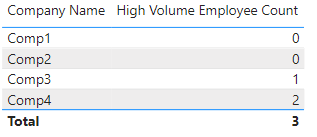
I cannot get a SUMX measure working for this scenario - would greatly appreciate advice:
I have a measure to count the number of distinct sales from a fact table:
Distinct Sales = CALCULATE(DISTINCTCOUNT(InteractionHistory[Activity ID]), InteractionHistory[Interaction Type] = “Sale”)
Another measure to assess "high volume" status by returning a 1 for 5 or more sales, otherwise a 0.
Volume=if([Distinct Sales]>=5,1,0)
This fact table is connected to a dimension table summarizing employees and a dimension table summarizing customers - the relevant fields in this scenario are:
EmployeeTeams[Employee Name]
Customers[Company Name]
What is the correct formulation of a measure that I can use in a matrix, whereby Company Name displays in rows and the count of employees with "high volume" status (i.e. Volume = 1) displays as the value?
Additionally, how to write a measure that sums these values across all companies. Understand that I can just display the total, but I want to nest in a time intelligence function to chart as a benchmark over time.
Thank you.