This time we’re going bigger than ever. Fabric, Power BI, SQL, AI and more. We're covering it all. You won't want to miss it.
Learn moreDid you hear? There's a new SQL AI Developer certification (DP-800). Start preparing now and be one of the first to get certified. Register now
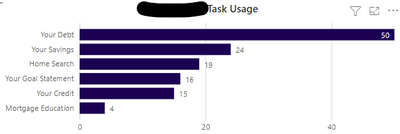
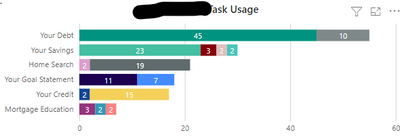
Hello all! I am very perplexed on a particular value for a report I am creating. So I created a visual which shows the amont of people who are doing a particular task of a site (1st Picture). For this visual, I am using a column from the data I got, as well as a measure I created which calculates the distinct count of users. Now, when I look to add the subtasks as a legend to the report, using the same other 2 values, it is showing an increase in values by 20. I am very perplexed on how there is a 20 point jump just by simply adding the subtask as a legend to the visual. I would also like to figure out how to grab the total value from the 2 visuals. I am just so confused on this. Is there a DAX formula I can use for it?
Hi @Anonymous
It is really hard to say based on your input. Is there a m:n or 1:n logic between your site and legend?
For being able to help you Can you please provide the following?
Best regards
Michael
-----------------------------------------------------
If this post helps, then please consider Accept it as the solution to help the other members find it more quickly. Appreciate your thumbs up!
@ me in replies or I'll lose your thread.
-----------------------------------------------------
Hello Mike! Certainly!
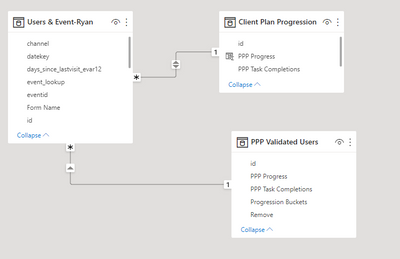
Here is the Model. They are one to many relationships between the IDs.
The only filter being applied is from an Excel sheet, which only includes people who are active with the Plan.
Check out the April 2026 Power BI update to learn about new features.
If you have recently started exploring Fabric, we'd love to hear how it's going. Your feedback can help with product improvements.
| User | Count |
|---|---|
| 36 | |
| 32 | |
| 31 | |
| 21 | |
| 15 |
| User | Count |
|---|---|
| 68 | |
| 57 | |
| 31 | |
| 29 | |
| 22 |