cancel
Showing results for 
Search instead for 
Did you mean: 

The Power BI Data Visualization World Championships is back! Get ahead of the game and start preparing now! Learn more

Reply
Anonymous
Not applicable

Issue with measures

So I am trying to estimate the time(in hours) of an assembly based on past averages. I am also trying to calculate the estimated division of hours based on past averages for each department of the company, ie each step the assembly went through during production.


I created 4 measures:


1. Total Hours for Assembly. I was trying to calculate the total hours. (Resource is the department during production). 


2. Average Assembly in Percent. I was trying to calculate the average times in the past so I can estimate times in the future. I divided the hours per resource by the total hours to get a decimal.

2.PNG


3. Estimated Hours. I was trying to calculate the estimated times for future assemblies, so I multiplied how many units haven't been built(left to ship) by the time per unit.

3.PNG


4. Estimated Division of Hours. I multiplied the past assembly averages by the estimated hours, to get the estimated hours for each resource during production.

4.PNG


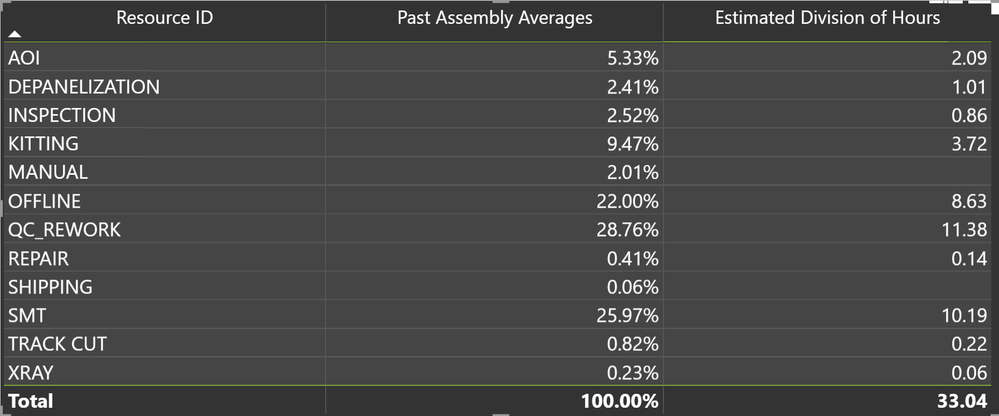
But when I make a table, for some assemblies, there are blank spaces in the estimated division of hours (as seen in the pic below). And when I manually calculate the estimated division of hours (past average percents * estimated hours for assembly) I do not get these numbers. I am not sure what is wrong and why some assemblies work, but not all. Any help would be greatly appreciated!!
5.PNG

1 ACCEPTED SOLUTION
Anonymous
Not applicable

@amitchandak 


As I was recreating the problem to post a sample doc, I realized that the original data was messed up. So I restarted and now it works!


Thanks anyways!!

View solution in original post

2 REPLIES 2
amitchandak
Super User
Super User

@Anonymous , Ideally Multiplication should be Sum(A*B), But as we can not do that across the table we need to make sure it happens across a common context.

Can you share sample data and sample output in table format? Or a sample pbix after removing sensitive data.

Share with Power BI Enthusiasts: Full Power BI Video (20 Hours) YouTube
Microsoft Fabric Series 60+ Videos YouTube
Microsoft Fabric Hindi End to End YouTube
Anonymous
Not applicable

@amitchandak 


As I was recreating the problem to post a sample doc, I realized that the original data was messed up. So I restarted and now it works!


Thanks anyways!!

Helpful resources

Announcements
Power BI DataViz World Championships

Power BI Dataviz World Championships

The Power BI Data Visualization World Championships is back! Get ahead of the game and start preparing now!

December 2025 Power BI Update Carousel

Power BI Monthly Update - December 2025

Check out the December 2025 Power BI Holiday Recap!

FabCon Atlanta 2026 carousel

FabCon Atlanta 2026

Join us at FabCon Atlanta, March 16-20, for the ultimate Fabric, Power BI, AI and SQL community-led event. Save $200 with code FABCOMM.