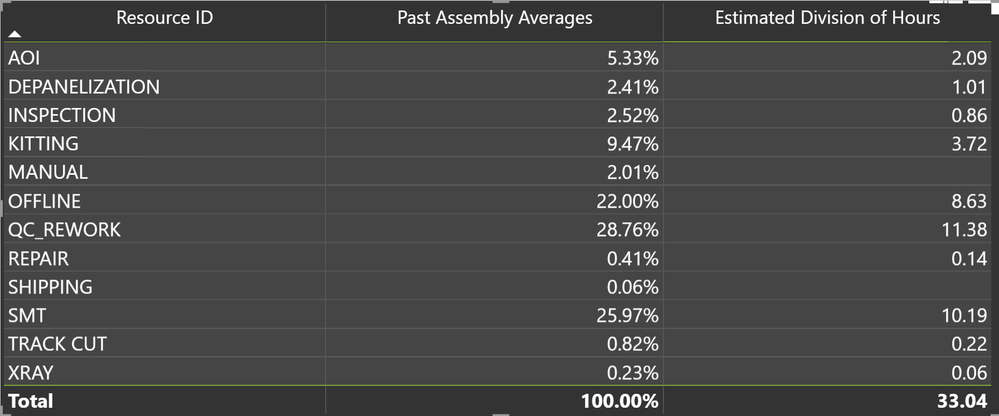
So I am trying to estimate the time(in hours) of an assembly based on past averages. I am also trying to calculate the estimated division of hours based on past averages for each department of the company, ie each step the assembly went through during production.
I created 4 measures:
1. Total Hours for Assembly. I was trying to calculate the total hours. (Resource is the department during production).
2. Average Assembly in Percent. I was trying to calculate the average times in the past so I can estimate times in the future. I divided the hours per resource by the total hours to get a decimal.

3. Estimated Hours. I was trying to calculate the estimated times for future assemblies, so I multiplied how many units haven't been built(left to ship) by the time per unit.

4. Estimated Division of Hours. I multiplied the past assembly averages by the estimated hours, to get the estimated hours for each resource during production.

But when I make a table, for some assemblies, there are blank spaces in the estimated division of hours (as seen in the pic below). And when I manually calculate the estimated division of hours (past average percents * estimated hours for assembly) I do not get these numbers. I am not sure what is wrong and why some assemblies work, but not all. Any help would be greatly appreciated!!