cancel
Showing results for 
Search instead for 
Did you mean: 

The Power BI Data Visualization World Championships is back! Get ahead of the game and start preparing now! Learn more

Reply
SittsBI
New Member

Issue with data display in the Matrix visual (unrequested data grouping)

Hi community,


I am trying to utilize the Matrix visual to create the table below, however, I am facing a serious issue. 

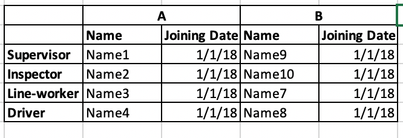
The data I'm analyzing is similar to the following:

PowerBI1.png

The expected result I am trying to achieve is:
PowerBI2.png


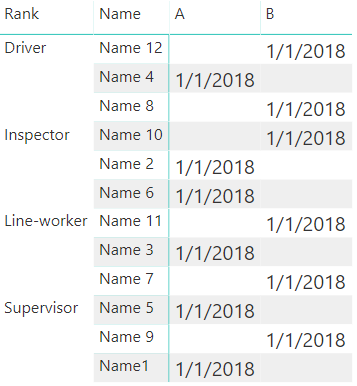
However, the actual result of such data set in the visual is:

PowerBI 3.png


The problem is that, by default, the visual group similar records (for example, if there are 2 supervisors in factory A, only one of them will be displayed). 

The only workaround I found so far is to add a drill-down for the "ID". The problem is that in this case, under the "supervisor", 4 lines will be displayed. When dealing with a large data set this is not a good result

Any ideas of how can I generate such a table or workaround the issue? 

2 REPLIES 2
v-piga-msft
Resident Rockstar
Resident Rockstar

Hi @SittsBI ,

By my tests and research, I'm afraid that we cannot achieve your desired output in Power BI currently.

For matrix, the value will be aggregated.

For workaround, you may try the matrix this format.

Capture.PNG

Best Regards,

Cherry


Community Support Team _ Cherry Gao
If this post helps, then please consider Accept it as the solution to help the other members find it more quickly.

Hi Cherry, 


Thanks for the reply.

Unfortunately, this workaround is good only in small data sets. 

If I have 30 factories, and each one has 1-3 in the same rank, this will not be a good solution. 


Is there any other idea how to workaround this request?

Helpful resources

Announcements
Power BI DataViz World Championships

Power BI Dataviz World Championships

The Power BI Data Visualization World Championships is back! Get ahead of the game and start preparing now!

December 2025 Power BI Update Carousel

Power BI Monthly Update - December 2025

Check out the December 2025 Power BI Holiday Recap!

FabCon Atlanta 2026 carousel

FabCon Atlanta 2026

Join us at FabCon Atlanta, March 16-20, for the ultimate Fabric, Power BI, AI and SQL community-led event. Save $200 with code FABCOMM.