
Join us at FabCon Atlanta from March 16 - 20, 2026, for the ultimate Fabric, Power BI, AI and SQL community-led event. Save $200 with code FABCOMM.
Register now!The Power BI Data Visualization World Championships is back! Get ahead of the game and start preparing now! Learn more
Hi,
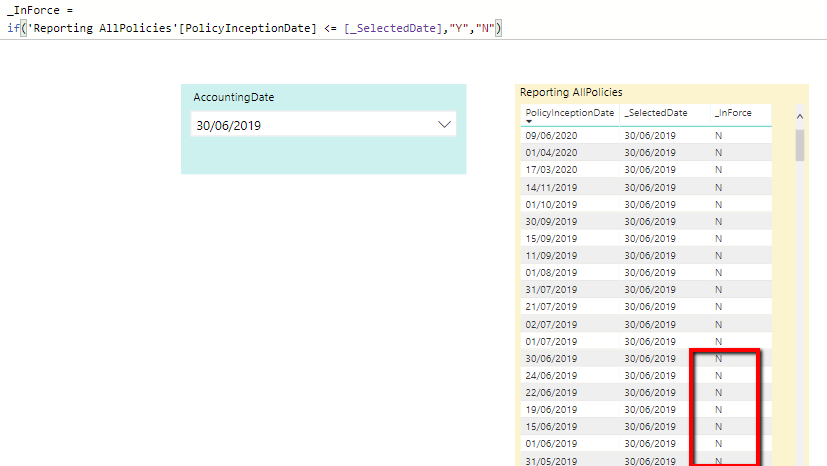
I have a Fact table "Reporting AllPolicies(Yellow Table) and I want to filter that base on that based on the users selection on the slicer "Accounting Date (Green Drop Down).
I have added a measure on the Yellow table to get the selected value from the slicer ("_SelectedDate")
Then I have added a new column and thought a basic if statement would allow me to filter the results.
See formula "_InForce" =
Solved! Go to Solution.
Hi @Anonymous
Try MAX(PolicyInceptionDate) it should give a the right result, measure will need some sort of aggregation as it does not have a row context.
Hope this helps
Mariusz
HI @Anonymous
You need to use Measure instad of a Column
Mariusz
Thanks for responding @Mariusz
I thought I would try a measure, but as part of the if statement I couldn't choose the field "PolicyInceptionDate"
Hi @Anonymous
Try MAX(PolicyInceptionDate) it should give a the right result, measure will need some sort of aggregation as it does not have a row context.
Hope this helps
Mariusz
The Power BI Data Visualization World Championships is back! Get ahead of the game and start preparing now!
| User | Count |
|---|---|
| 38 | |
| 36 | |
| 33 | |
| 32 | |
| 29 |
| User | Count |
|---|---|
| 129 | |
| 88 | |
| 79 | |
| 68 | |
| 63 |