
cancel
Showing results for 
Search instead for 
Did you mean: 

We've captured the moments from FabCon & SQLCon that everyone is talking about, and we are bringing them to the community, live and on-demand. Starts on April 14th. Register now

Reply
Anonymous
Not applicable

dynamic date filter

Hi,


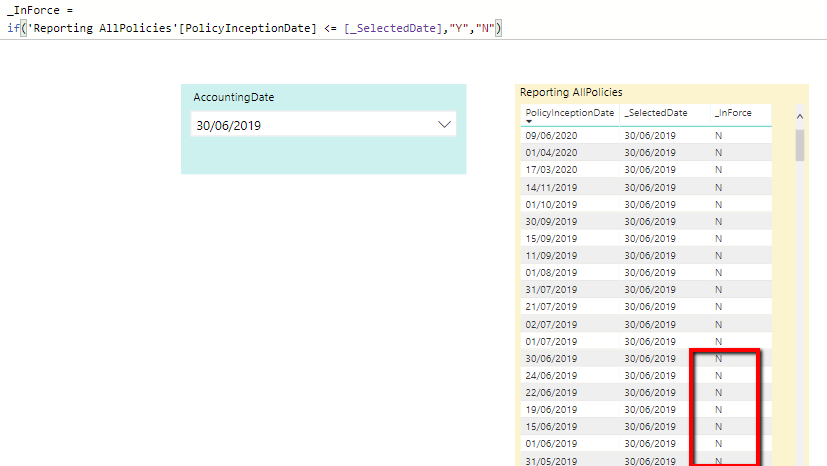
I have a Fact table "Reporting AllPolicies(Yellow Table) and I want to filter that base on that based on the users selection on the slicer "Accounting Date (Green Drop Down).


I have added a measure on the Yellow table to get the selected value from the slicer ("_SelectedDate")


Then I have added a new column and thought a basic if statement would allow me to filter the results.

See formula "_InForce" = 

if('Reporting AllPolicies'[PolicyInceptionDate] <= [_SelectedDate],"Y","N")
 
However, see highlighted red items that I would expect the results to be "Y".
 
PBI_Dates.png
 
 
Can someone assist on what I'm doing wrong or if there's another way to do it?
 
Thanks
 
Jason
1 ACCEPTED SOLUTION

Hi @Anonymous 

Try MAX(PolicyInceptionDate) it should give a the right result, measure will need some sort of aggregation as it does not have a row context.


Hope this helps 

Mariusz

View solution in original post

3 REPLIES 3
Mariusz
Community Champion
Community Champion

HI @Anonymous 

You need to use Measure instad of a Column

Mariusz

Anonymous
Not applicable

Thanks for responding @Mariusz 

I thought I would try a measure, but as part of the if statement I couldn't choose the field "PolicyInceptionDate"


PBI_Dates2.png

Hi @Anonymous 

Try MAX(PolicyInceptionDate) it should give a the right result, measure will need some sort of aggregation as it does not have a row context.


Hope this helps 

Mariusz

Helpful resources

Announcements
New to Fabric survey Carousel

New to Fabric Survey

If you have recently started exploring Fabric, we'd love to hear how it's going. Your feedback can help with product improvements.

Power BI DataViz World Championships carousel

Power BI DataViz World Championships - June 2026

A new Power BI DataViz World Championship is coming this June! Don't miss out on submitting your entry.

Join our Fabric User Panel

Join our Fabric User Panel

Share feedback directly with Fabric product managers, participate in targeted research studies and influence the Fabric roadmap.

March Power BI Update Carousel

Power BI Community Update - March 2026

Check out the March 2026 Power BI update to learn about new features.