This is best Fabric, Power BI, SQL and AI community event. How do we know? The last event sold out! Save €200 with code FABCMTY200.
Register nowA new Data Days event is coming soon! This time we’re going bigger than ever. Fabric, Power BI, SQL, AI and more. Don't miss out.
Hello
I use the following SQL statement but it only shows the Table4's values and all the rest values from the fields of the other tables are null.
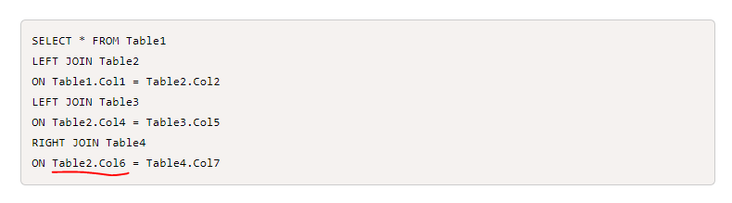
SELECT * FROM Table1
LEFT JOIN Table2
ON Table1.Col1 = Table2.Col2
LEFT JOIN Table3
ON Table2.Col4 = Table3.Col5
RIGHT JOIN Table4
ON Table2.Col6 = Table4.Col7
Any idea?
Thanks!
Hi @Anonymous ,
Not sure if I understand your issue correctly.
Are you using this sql query in Power BI or you want to replicate similar query in Power BI?
Please add details: https://community.powerbi.com/t5/Community-Blog/How-to-Get-Your-Question-Answered-Quickly/ba-p/38490
Thanks,
Pragati
hi @Pragati11
I am putting this SQL statement in Power BI but it does not produce the result it should. The statement might be wrong, any hint?
Thanks
Hi @Anonymous ,
Try replacing the highlighted section as shown below with Table3.Col5:
Thanks,
Pragati
Hi @Pragati11
Thanks but Table4.Col7 can only be joined with Table2.Col6. The Table3.Col5 is not relevant to Table4.Col7.
Any other idea?
Hi @Anonymous ,
It is very difficult to analyze without looking at the data and just by imagining.
Is this statement correct in SQL?
Best Regards,
Liang
If this post helps, then please consider Accept it as the solution to help the other members find it more quickly.
Sign up to receive a private message when registration opens and key events begin.
If you have recently started exploring Fabric, we'd love to hear how it's going. Your feedback can help with product improvements.
| User | Count |
|---|---|
| 32 | |
| 26 | |
| 21 | |
| 20 | |
| 15 |
| User | Count |
|---|---|
| 65 | |
| 43 | |
| 28 | |
| 24 | |
| 22 |