We've captured the moments from FabCon & SQLCon that everyone is talking about, and we are bringing them to the community, live and on-demand. Starts on April 14th. Register now
Let’s consider I have data as shown in below table and I want to calculate Running Total of Amount column as shown in last column i.e Running Total.
Category | TypeID | Date | Amount | Running Total |
A | 12 | 19-11-2017 | 10 | 10 |
A | 23 | 20-11-2017 | 10 | 20 |
B | 15 | 21-11-2017 | 10 | 30 |
C | 12 | 23-11-2017 | 10 | 40 |
B | 23 | 24-11-2017 | 10 | 50 |
C | 16 | 25-11-2017 | 10 | 60 |
I have tried with built in functionality of power BI i.e. “New quick measure” -> “Running Total”. But it does not work for me as you can see here multiple dimension present in the table (Category, TypeID, Date).
I have also tried with the solution from the following post, but it does not work for me:
http://community.powerbi.com/t5/Desktop/DAX-Running-total-by-another-column/td-p/10512
Any ideas would be much appreciated. Thanks for any help in advance!
Solved! Go to Solution.
Hi @mayurdhote
In that case.
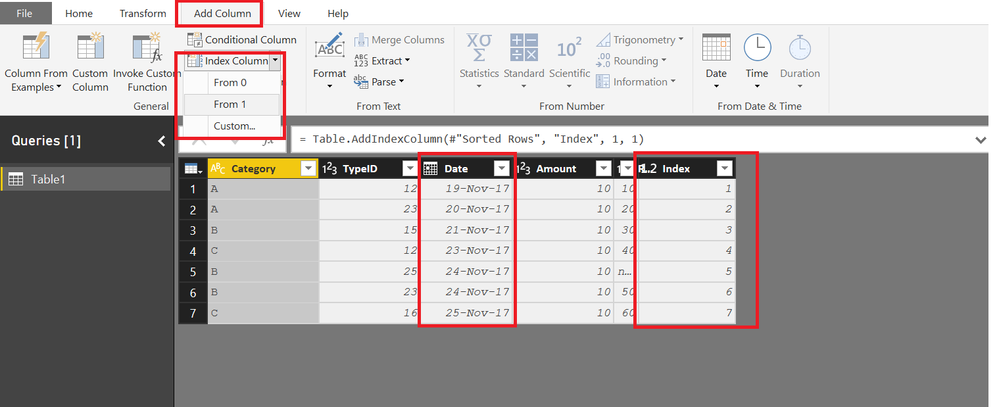
First Add an Index Column to your Table using QUERY Editor
(Before adding Index Sort your Table by Dates if not already sorted)
Now you can get the Cumulative Total using this Index Column
Running_Total with Index =
CALCULATE (
SUM ( Table1[Amount] ),
FILTER ( ALL ( Table1 ), Table1[Index] <= MAX ( Table1[Index] ) )
)
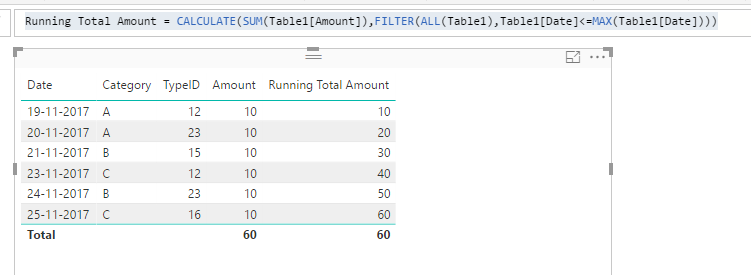
In your scenario, only Data column contains unique values, so you should apply filter on Date column.
Running Total Amount = CALCULATE(SUM(Table1[Amount]),FILTER(ALL(Table1),Table1[Date]<=MAX(Table1[Date])))
Regards,
Thanks @v-sihou-msft !
But what if in above scenario, date column does not have unique values?
Hi @mayurdhote
In that case.
First Add an Index Column to your Table using QUERY Editor
(Before adding Index Sort your Table by Dates if not already sorted)
Now you can get the Cumulative Total using this Index Column
Running_Total with Index =
CALCULATE (
SUM ( Table1[Amount] ),
FILTER ( ALL ( Table1 ), Table1[Index] <= MAX ( Table1[Index] ) )
)
Hi Zubair,
I know this is an old post, but I tried to replicate your solution but it seems I'm getting repeated values in my running total column. See snapshot below:
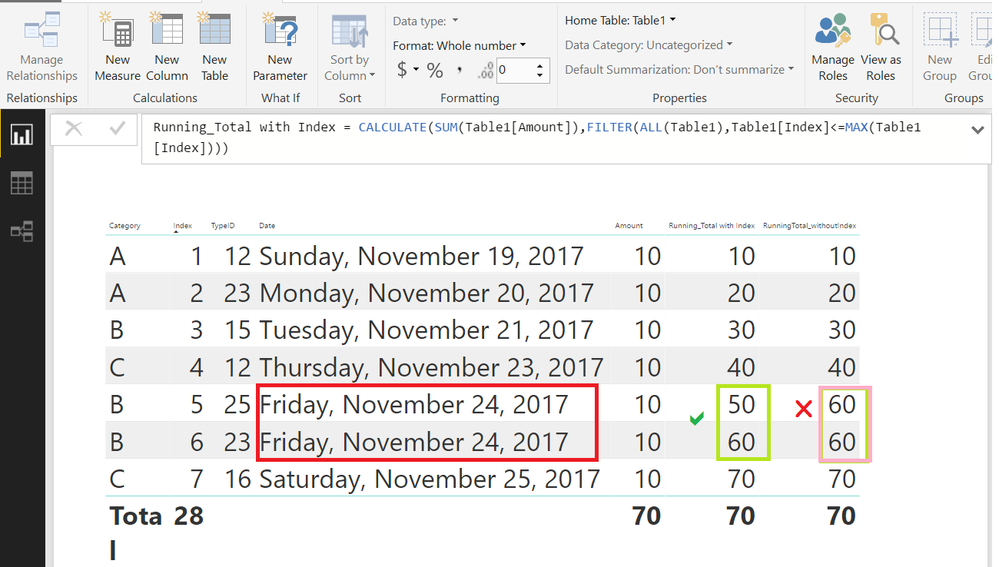
The image below shows the Cumulative Total with and without Index
It is your sample data. I just added one row with same date
If you have recently started exploring Fabric, we'd love to hear how it's going. Your feedback can help with product improvements.
A new Power BI DataViz World Championship is coming this June! Don't miss out on submitting your entry.
Share feedback directly with Fabric product managers, participate in targeted research studies and influence the Fabric roadmap.
| User | Count |
|---|---|
| 53 | |
| 38 | |
| 33 | |
| 17 | |
| 17 |
| User | Count |
|---|---|
| 67 | |
| 62 | |
| 38 | |
| 34 | |
| 22 |