cancel
Showing results for 
Search instead for 
Did you mean: 

July 7 - July 17 | Round 2 of the Power BI Dataviz World Championships. Don't miss your chance! Learn more

Reply
mayurdhote
Regular Visitor

Issue with Running Total

Let’s consider I have data as shown in below table and I want to calculate Running Total of Amount column as shown in last column i.e Running Total.


Category

TypeID

Date

Amount

Running Total

A

12

19-11-2017

10

10

A

23

20-11-2017

10

20

B

15

21-11-2017

10

30

C

12

23-11-2017

10

40

B

23

24-11-2017

10

50

C

16

25-11-2017

10

60


I have tried with built in functionality of power BI i.e. “New quick measure->Running Total”. But it does not  work for me as you can see here multiple dimension present in the table (Category, TypeID, Date).


I have also tried with the solution from the following post, but it does not work for me:

http://community.powerbi.com/t5/Desktop/DAX-Running-total-by-another-column/td-p/10512


Any ideas would be much appreciated.  Thanks for any help in advance!

1 ACCEPTED SOLUTION

Hi @mayurdhote


In that case.


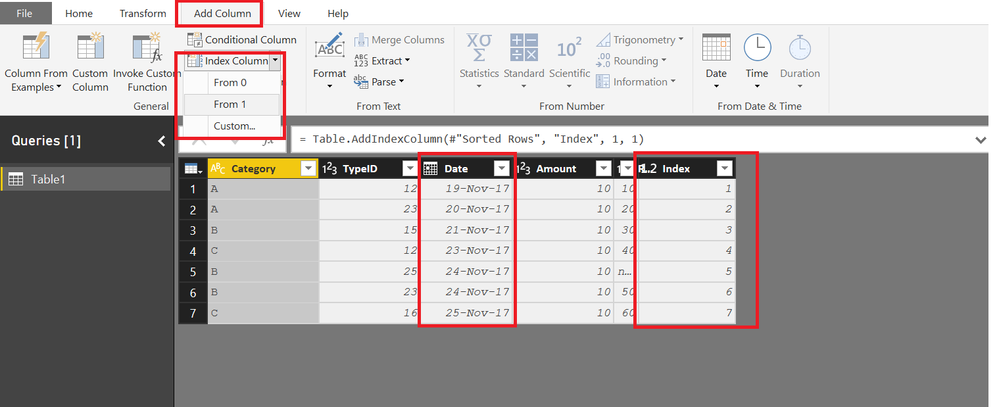
First Add an Index Column to your Table using QUERY Editor

(Before adding Index Sort your Table by Dates if not already sorted)


47.png


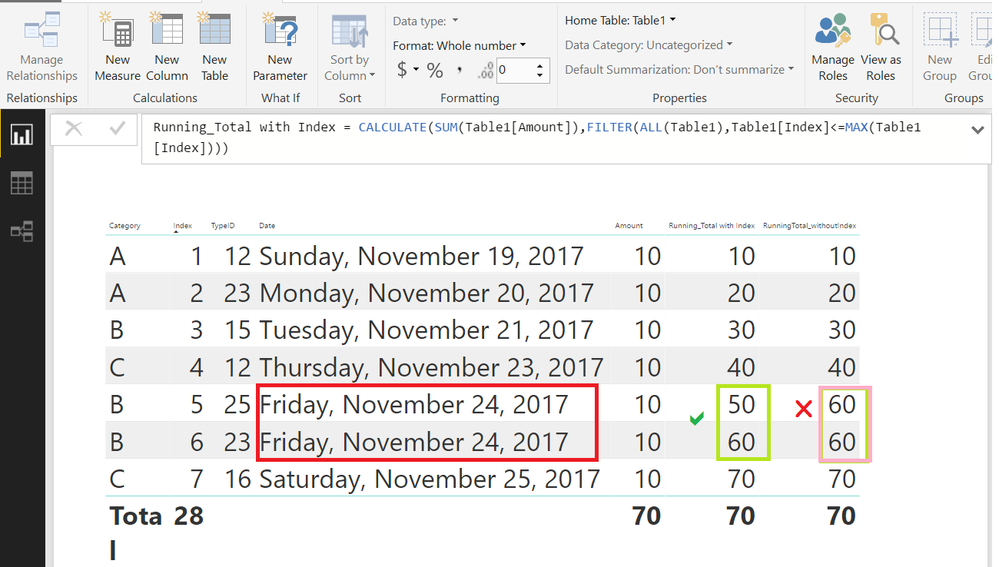
Now you can get the Cumulative Total using this Index Column


Running_Total with Index =
CALCULATE (
    SUM ( Table1[Amount] ),
    FILTER ( ALL ( Table1 ), Table1[Index] <= MAX ( Table1[Index] ) )
)

View solution in original post

5 REPLIES 5
v-sihou-msft
Microsoft Employee
Microsoft Employee

@mayurdhote


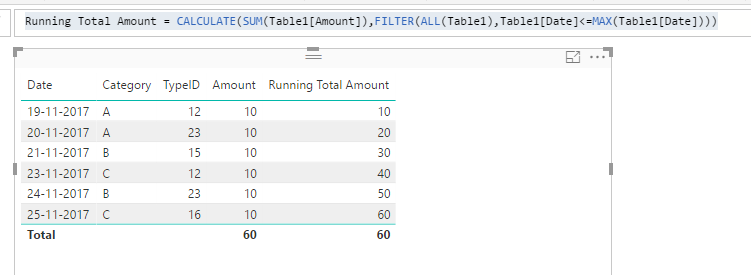
In your scenario, only Data column contains unique values, so you should apply filter on Date column. 


Running Total Amount = CALCULATE(SUM(Table1[Amount]),FILTER(ALL(Table1),Table1[Date]<=MAX(Table1[Date])))

24.PNG


Regards,

Thanks @v-sihou-msft !

But what if in above scenario, date column does not have unique values?

Hi @mayurdhote


In that case.


First Add an Index Column to your Table using QUERY Editor

(Before adding Index Sort your Table by Dates if not already sorted)


47.png


Now you can get the Cumulative Total using this Index Column


Running_Total with Index =
CALCULATE (
    SUM ( Table1[Amount] ),
    FILTER ( ALL ( Table1 ), Table1[Index] <= MAX ( Table1[Index] ) )
)

Hi Zubair,

I know this is an old post, but I tried to replicate your solution but it seems I'm getting repeated values in my running total column. See snapshot below:

 test.png

@mayurdhote


The image below shows the Cumulative Total with and without Index

It is your sample data. I just added one row with same date


49.png

Helpful resources

Announcements
FabCon and SQLCon Barcelona 2026

FabCon & SQLCon – Barcelona 2026

Join us in Barcelona for FabCon and SQLCon, the Fabric, Power BI, SQL, and AI community event. Save €200 with code FABCMTY200.

60 days of Data Days Carousel

Data Days 2026

Join Data Days 2026: 60 days of free live/on-demand sessions, challenges, study groups, and certification opportunities.

Power BI DataViz World Championships carousel

Power BI DataViz World Championships - June 2026

A new Power BI DataViz World Championship is coming this June! Don't miss out on submitting your entry.

Top Solution Authors