Join us at FabCon Atlanta from March 16 - 20, 2026, for the ultimate Fabric, Power BI, AI and SQL community-led event. Save $200 with code FABCOMM.
Register now!The Power BI Data Visualization World Championships is back! It's time to submit your entry. Live now!
Hi everyone,
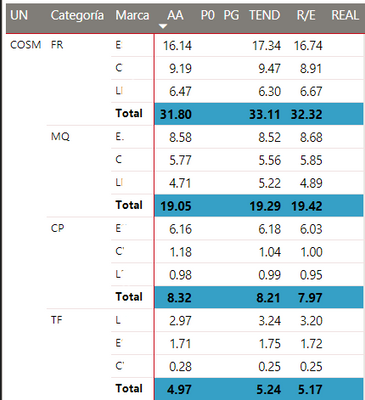
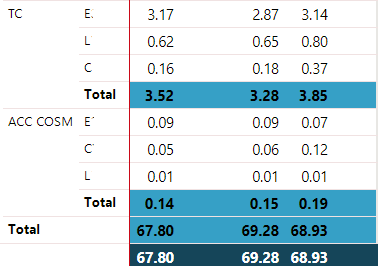
I've got a problem with a matrix subtotal in "TC" and also not reflecting it at the total. Any suggestions?
Thanks,
Sol
Hi anyone knows how to solve a problem where i have a rankx of taking top 20 only and i want to remove the rows that are not in the top 20. im using a matrices chart and it has hierarchy with country>customer>product. i want to remove country, customer and product that are not in the top 20 list. can someone help me with this please?
I have to use a dax to do this and have tried using the filter pane hiding blanks, NOT ISBLANK,BLANK(),but its not working.
Hi,
Share some data and show the expected result.
Hi @sbellidoBI,
I think you are use measure formula with filters on value fields, right?
If this is a case, current measure with filters not fully works on subtotal level, you need to add condition to check summary level and write specific formula for subtotal level:
Subtotals and Grand Totals That Add Up “Correctly”
Regards,
Xiaoxin Sheng
The Power BI Data Visualization World Championships is back! It's time to submit your entry.
Check out the January 2026 Power BI update to learn about new features.
| User | Count |
|---|---|
| 56 | |
| 42 | |
| 40 | |
| 21 | |
| 21 |
| User | Count |
|---|---|
| 149 | |
| 105 | |
| 63 | |
| 36 | |
| 36 |