cancel
Showing results for 
Search instead for 
Did you mean: 

July 28 - August 9 | Final Round of the Power BI Dataviz World Championships. This is your chance. Learn more

Reply
Anonymous
Not applicable

Import data storage

Hello, 


I am trying to find a way to imported data to an appended data so that when the import refreshes, the appended table keeps growing. 


For example, 

there are two data tables, totalData and salesforceDate

the initial totalData data table looks like this:

StoreItem Price 
AChair 100
ATV475
ALamp 60


SalesforceData (Day 1)

StoreItem Price 
BPhone300
BToy25
BCandy1


saleforceData (Day 2)

StoreItem Price 
CShoes40
CBag15
CShirt15


If I set salesforceData to refresh everyday, 

My goal is so that at the end of Day 2, totalData (which appends salesforceData)  has data for stores A,B, and C (days 1 and 2). However, I am currently only getting data for stores A and C after day 2 as a result of the refresh deleting old data. Is there a way to work around this?

I need this because salesforce is only able to load reports of 2000 rows. Thus I need to pull data daily but do not have the time to append a new table every day. 


Thank you. Appreciate any solution to this problem. 


5 REPLIES 5
metrica
Post Prodigy
Post Prodigy

Hi @Anonymous 


Power BI Import refresh is not designed to work as append-only storage. On a full refresh, the imported table is reloaded from the source, so old Salesforce rows will not be kept automatically.


If you need daily history, I would use one of these patterns:

  1. Store daily Salesforce extracts in a database, lakehouse, warehouse, or another append-capable storage layer.

  2. Use incremental refresh only if your Salesforce query has a stable DateTime field and can be filtered by date.

  3. If possible, use Salesforce Objects instead of Salesforce Reports and rebuild the logic in Power BI.

The 2,000-row issue comes from the Salesforce Reports path. If you keep using Salesforce Reports, daily appending can become a fragile workaround.


Another option is Power BI Connector for Salesforce by Metrica Software: https://appexchange.salesforce.com/appxListingDetail?listingId=31526f0e-abd8-4cb5-bd1a-3bd56b5c0577


It lets you prepare Salesforce data sources, select objects and fields, apply filters, preview the output, and use SOQL mode when needed. This can help avoid splitting Salesforce reports into manual daily exports.


Docs and support:
https://metricasoftware.com/docs/salesforce/
https://metricasoftware.com/docs/salesforce/contact-support/


Cheers,
Metrica Team

QueryWhiz
Post Patron
Post Patron

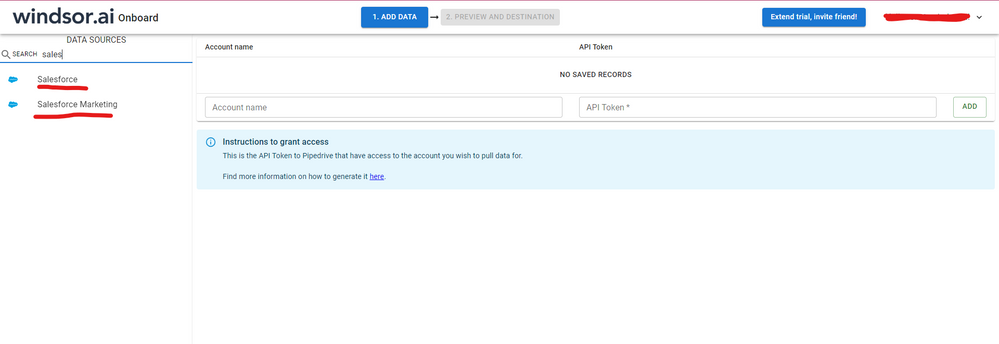
Hi @Anonymous were you able to find a solution? As a workaround, maybe you can try to test your connection with a 3rd party connector. I've tried windsor.ai, supermetrics and funnel.io. I stayed with windsor because it is much cheaper so just to let you know other options. In case you wonder, to make the connection first search for the Salesforce connector in the data sources list:


SALESFORCE-1.png


After that, just grant access to your Salesforce account using your credentials, then on preview and destination page you will see a preview of your Salesforce fields:


SALESFORCE-2.png


There just select the fields you need. It is also compatible with custom fields and custom objects, so you'll be able to export them through windsor.  Finally, just select PBI as your data destination and finally just copy and paste the url on PBI --> Get Data --> Web --> Paste the url. 


SELECT_DESTINATION_NEW.png

v-xicai
Community Support
Community Support

Hi @Anonymous ,


There is a workaround you can considerate, following the steps below.


1.Save these data tables in OneDrive for Business, create a new column named "Day number" in totalData table to storage the days in later step 3.


2.Connect to the excel file totalData located in OneDrive for Business using Web connector, see more detail: Use OneDrive for Business links in Power BI Desktop.


3.Once there are new SalesforceData, you can append the new data into the totalData table by doing copy and post.


4.Click Refresh button to get the latest data.


Best Regards,

Amy


If this post helps, then please consider Accept it as the solution to help the other members find it more quickly


Anonymous
Not applicable

Thank you for your help. @v-xicai 


So does the salesforce data have to be copy and posted every day manually? Also, just for clarification, is  the salesforce data being appended on one drive?

Hi @Anonymous ,


It is a clumsy workaround, right?Smiley Embarassed You may need copy and poste every day manually. For the SalesforceData, you may needn't to upload it to OneDrive for Business.


Best Regards,

Amy


Helpful resources

Announcements
FabCon and SQLCon Barcelona 2026

FabCon & SQLCon – Barcelona 2026

Join us in Barcelona for FabCon and SQLCon, the Fabric, Power BI, SQL, and AI community event. Save €200 with code FABCMTY200.

Fabric Community Sticker Design Challenge Barcelona Carousel

Fabric Community Sticker Challenge - Barcelona 2026

If you love stickers, then you will definitely want to check out our community sticker challenge, Barcelona edition!

July Power BI Update Carousel

Power BI Monthly Update - July 2026

Check out the July 2026 Power BI update to learn about new features.

Power BI DataViz World Championships carousel

Power BI DataViz World Championships - June 2026

A new Power BI DataViz World Championship is coming this June! Don't miss out on submitting your entry.