
Join us at FabCon Atlanta from March 16 - 20, 2026, for the ultimate Fabric, Power BI, AI and SQL community-led event. Save $200 with code FABCOMM.
Register now!The Power BI Data Visualization World Championships is back! Get ahead of the game and start preparing now! Learn more
Hi Team,
In my data in one column i have captured url of images, when i'm creating tables or other visuals using those url's they are not getting converted into images.
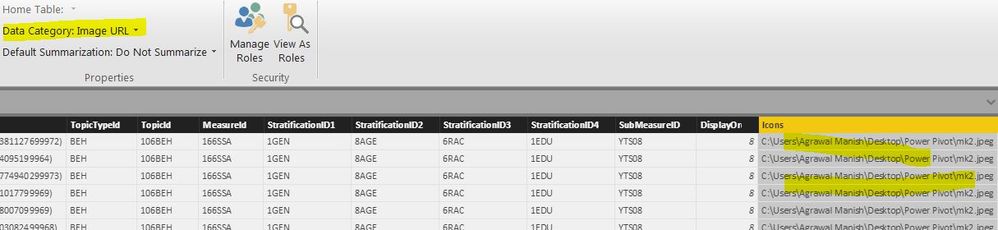
I have changed data type of that column as URL in model,i'm using Power BI desktop.
is there any specific visual which can only be used for that puropse ?
Solved! Go to Solution.
I can't find any specific doco on it, apart from http://community.powerbi.com/t5/Service/How-to-Include-images-in-reports-from-folder-or-url-or-binar... but Power BI may be, strictly speaking, looking for a http:// based URL rather than C:\...
Does it work if you source your images from OneDrive etc. ?
Did you set the Data Category (not Data Type) to "Image URL" ?
Under Properties on the ribbon, to the right of Formatting etc.
Yes i did that. attached are screenshot for your ref.report view
data model view
I can't find any specific doco on it, apart from http://community.powerbi.com/t5/Service/How-to-Include-images-in-reports-from-folder-or-url-or-binar... but Power BI may be, strictly speaking, looking for a http:// based URL rather than C:\...
Does it work if you source your images from OneDrive etc. ?
Thanks for your help, you are right when i did liniing directly from http it worked but with local images it was not working.
The Power BI Data Visualization World Championships is back! Get ahead of the game and start preparing now!
| User | Count |
|---|---|
| 39 | |
| 37 | |
| 33 | |
| 32 | |
| 29 |
| User | Count |
|---|---|
| 132 | |
| 88 | |
| 82 | |
| 68 | |
| 64 |