Join us at FabCon Atlanta from March 16 - 20, 2026, for the ultimate Fabric, Power BI, AI and SQL community-led event. Save $200 with code FABCOMM.
Register now!The Power BI Data Visualization World Championships is back! It's time to submit your entry. Live now!
I am fairly new to Power BI. I would like to import data from an ODBC and/or SQL Server, but there are millions of records and the import process would take considerable amount of time. Two questions:
Solved! Go to Solution.
When you connect to SQL Server, click the Advanced link and you can enter a SQL query. You can definitely do Direct Query against SQL Server. You can also enter a SQL query with ODBC but I don't believe that ODBC currently has Direct Query support. However, I know that supporting Direct Query in as many connectors as possible is priority with the Power BI team.
Hi @cheid1977,
1. Where do you write an SQL formula that will allow only a certain date range to be imported?
When we connect to SQL Server database, we can write T-SQL query like below:
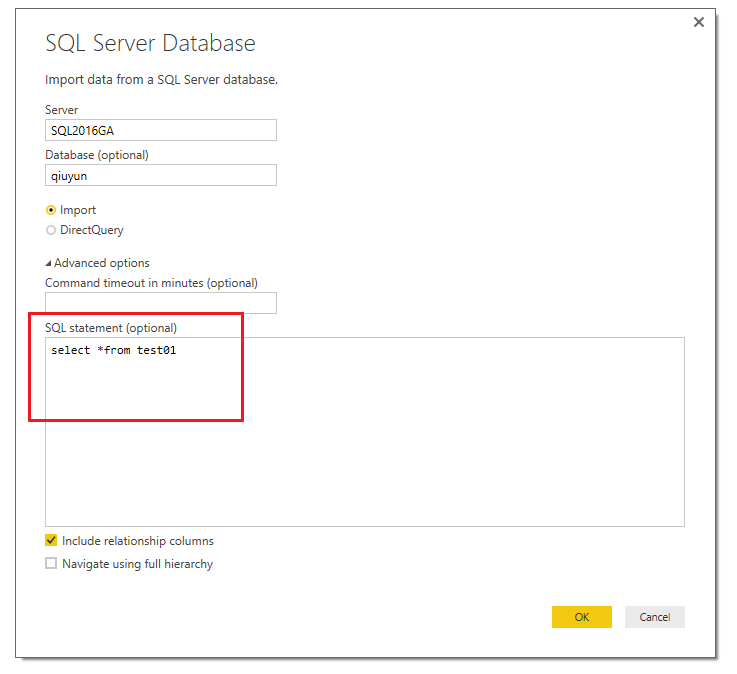
By the way, if you want to write complex T-SQL query, please use Import mode instead of DirectQuery mode. As I found many communities come across the issue when write query in DirectQuery, and this issue already reported internally.
2. Can you do a Direct Query utilizing the ODBC connection?
ODBC data source is not supported in DirectQuery mode, supported data source are below:
• SQL Server
• Azure SQL Database
• Azure SQL Data Warehouse
• SAP HANA
• Oracle Database
• Teradata Database
• Amazon Redshift (Preview)
• Impala (Preview)
• Snowflake (Preview)
For more information, please refer to this article: Use DirectQuery in Power BI Desktop
Best Regards,
Qiuyun Yu
Hi @cheid1977,
1. Where do you write an SQL formula that will allow only a certain date range to be imported?
When we connect to SQL Server database, we can write T-SQL query like below:
By the way, if you want to write complex T-SQL query, please use Import mode instead of DirectQuery mode. As I found many communities come across the issue when write query in DirectQuery, and this issue already reported internally.
2. Can you do a Direct Query utilizing the ODBC connection?
ODBC data source is not supported in DirectQuery mode, supported data source are below:
• SQL Server
• Azure SQL Database
• Azure SQL Data Warehouse
• SAP HANA
• Oracle Database
• Teradata Database
• Amazon Redshift (Preview)
• Impala (Preview)
• Snowflake (Preview)
For more information, please refer to this article: Use DirectQuery in Power BI Desktop
Best Regards,
Qiuyun Yu
When you connect to SQL Server, click the Advanced link and you can enter a SQL query. You can definitely do Direct Query against SQL Server. You can also enter a SQL query with ODBC but I don't believe that ODBC currently has Direct Query support. However, I know that supporting Direct Query in as many connectors as possible is priority with the Power BI team.
| User | Count |
|---|---|
| 51 | |
| 38 | |
| 33 | |
| 22 | |
| 19 |
| User | Count |
|---|---|
| 136 | |
| 101 | |
| 58 | |
| 36 | |
| 35 |