cancel
Showing results for 
Search instead for 
Did you mean: 

Try your skills in the Power BI Dataviz World Championship! Round one ends June 26. Join now

Reply
cheid1977
Advocate I
Advocate I

Importing specific date range using ODBC

I am fairly new to Power BI.  I would like to import data from an ODBC and/or SQL Server, but there are millions of records and the import process would take considerable amount of time.  Two questions:


  1. Where do you write an SQL formula that will allow only a certain date range to be imported?
  2. Can you do a Direct Query utilizing the ODBC connection?


2 ACCEPTED SOLUTIONS
Greg_Deckler
Community Champion
Community Champion

When you connect to SQL Server, click the Advanced link and you can enter a SQL query. You can definitely do Direct Query against SQL Server. You can also enter a SQL query with ODBC but I don't believe that ODBC currently has Direct Query support. However, I know that supporting Direct Query in as many connectors as possible is priority with the Power BI team.


Follow on LinkedIn
@ me in replies or I'll lose your thread!!!
Instead of a Kudo, please vote for this idea
Become an expert!: Enterprise DNA
External Tools: MSHGQM
YouTube Channel!: Microsoft Hates Greg
Latest book!:
DAX For Humans

DAX is easy, CALCULATE makes DAX hard...

View solution in original post

v-qiuyu-msft
Community Support
Community Support

Hi @cheid1977,


1. Where do you write an SQL formula that will allow only a certain date range to be imported?


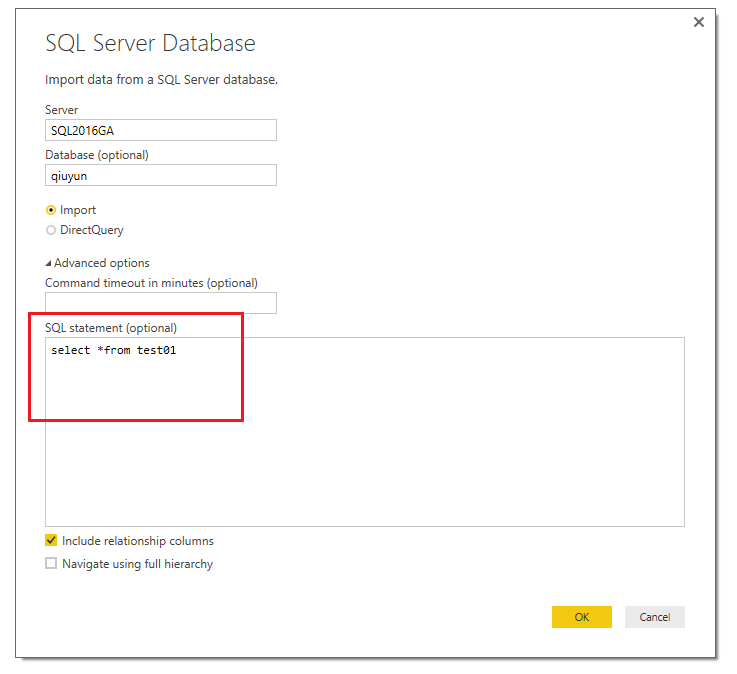
When we connect to SQL Server database, we can write T-SQL query like below:
 

w1.PNG


By the way, if you want to write complex T-SQL query, please use Import mode instead of DirectQuery mode. As I found many communities come across the issue when write query in DirectQuery, and this issue already reported internally.


2. Can you do a Direct Query utilizing the ODBC connection?


ODBC data source is not supported in DirectQuery mode, supported data source are below:


• SQL Server
• Azure SQL Database
• Azure SQL Data Warehouse
• SAP HANA
• Oracle Database
• Teradata Database
• Amazon Redshift (Preview)
• Impala (Preview)
• Snowflake (Preview)


For more information, please refer to this article: Use DirectQuery in Power BI Desktop


Best Regards,

Qiuyun Yu

Community Support Team _ Qiuyun Yu
If this post helps, then please consider Accept it as the solution to help the other members find it more quickly.

View solution in original post

2 REPLIES 2
v-qiuyu-msft
Community Support
Community Support

Hi @cheid1977,


1. Where do you write an SQL formula that will allow only a certain date range to be imported?


When we connect to SQL Server database, we can write T-SQL query like below:


w1.PNG


By the way, if you want to write complex T-SQL query, please use Import mode instead of DirectQuery mode. As I found many communities come across the issue when write query in DirectQuery, and this issue already reported internally.


2. Can you do a Direct Query utilizing the ODBC connection?


ODBC data source is not supported in DirectQuery mode, supported data source are below:


• SQL Server
• Azure SQL Database
• Azure SQL Data Warehouse
• SAP HANA
• Oracle Database
• Teradata Database
• Amazon Redshift (Preview)
• Impala (Preview)
• Snowflake (Preview)


For more information, please refer to this article: Use DirectQuery in Power BI Desktop


Best Regards,

Qiuyun Yu

Community Support Team _ Qiuyun Yu
If this post helps, then please consider Accept it as the solution to help the other members find it more quickly.
Greg_Deckler
Community Champion
Community Champion

When you connect to SQL Server, click the Advanced link and you can enter a SQL query. You can definitely do Direct Query against SQL Server. You can also enter a SQL query with ODBC but I don't believe that ODBC currently has Direct Query support. However, I know that supporting Direct Query in as many connectors as possible is priority with the Power BI team.


Follow on LinkedIn
@ me in replies or I'll lose your thread!!!
Instead of a Kudo, please vote for this idea
Become an expert!: Enterprise DNA
External Tools: MSHGQM
YouTube Channel!: Microsoft Hates Greg
Latest book!:
DAX For Humans

DAX is easy, CALCULATE makes DAX hard...

Helpful resources

Announcements
Fabric Data Days is here Carousel

Fabric Data Days 2026

Don't miss out on Data Days, June 15 through August 7. Learn Fabric, Power BI, SQL, AI and more.

Power BI DataViz World Championships carousel

Power BI DataViz World Championships - June 2026

A new Power BI DataViz World Championship is coming this June! Don't miss out on submitting your entry.