Don't miss your chance to take exam DP-600 or DP-700 on us!
Request nowLearn from the best! Meet the four finalists headed to the FINALS of the Power BI Dataviz World Championships! Register now
Hello everybody,
I want to create in Power BI desktop a new column which will compare 2 other columns.
The purpose is to identify duplicates between these 2 columns.
In Excel, my formula will look like this:
If Column 1 = Column 2 Then "YES"
Else "NO"
but I don't know how to do that in Power BI.
Thx a lot for your help.
Samir.
Solved! Go to Solution.
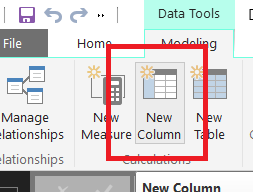
Simple than excel , in the same table create "new column" from the ribbon of PowerBI Desktop or right click the field name on the right pane , and the formula is
IsDuplicate = Column1 = Column2 This will return FALSE & TRUE...When returns true that means that is duplicated.
Now if you need to add it as slicer or filter( True & False is not that good visible ) then
IsDuplicate =IF ( Column1 = Column2 ; " Yes"; "No")
Simple than excel , in the same table create "new column" from the ribbon of PowerBI Desktop or right click the field name on the right pane , and the formula is
IsDuplicate = Column1 = Column2 This will return FALSE & TRUE...When returns true that means that is duplicated.
Now if you need to add it as slicer or filter( True & False is not that good visible ) then
IsDuplicate =IF ( Column1 = Column2 ; " Yes"; "No")
Thank you for the tip! Is there a way to identify duplicates within one column?
I have a column 'Full Name'. I want to see if there is the same name two or more times
I have a column 'Emails'. I want to make sure that all emails are unique.
I don't want to delete duplicates. I want to see them for checking my CRM and correct mistakes.
| User | Count |
|---|---|
| 52 | |
| 41 | |
| 32 | |
| 15 | |
| 13 |
| User | Count |
|---|---|
| 84 | |
| 72 | |
| 37 | |
| 27 | |
| 24 |