Get certified for free when you join Fabric Data Days 2026 and dive into Fabric, Power BI, SQL, AI, and other essential data skills.
Join nowJuly 7 - July 17 | Round 2 of the Power BI Dataviz World Championships. Don't miss your chance! Learn more
Hello everybody,
I want to create in Power BI desktop a new column which will compare 2 other columns.
The purpose is to identify duplicates between these 2 columns.
In Excel, my formula will look like this:
If Column 1 = Column 2 Then "YES"
Else "NO"
but I don't know how to do that in Power BI.
Thx a lot for your help.
Samir.
Solved! Go to Solution.
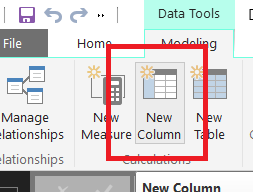
Simple than excel , in the same table create "new column" from the ribbon of PowerBI Desktop or right click the field name on the right pane , and the formula is
IsDuplicate = Column1 = Column2 This will return FALSE & TRUE...When returns true that means that is duplicated.
Now if you need to add it as slicer or filter( True & False is not that good visible ) then
IsDuplicate =IF ( Column1 = Column2 ; " Yes"; "No")
Simple than excel , in the same table create "new column" from the ribbon of PowerBI Desktop or right click the field name on the right pane , and the formula is
IsDuplicate = Column1 = Column2 This will return FALSE & TRUE...When returns true that means that is duplicated.
Now if you need to add it as slicer or filter( True & False is not that good visible ) then
IsDuplicate =IF ( Column1 = Column2 ; " Yes"; "No")
Thank you for the tip! Is there a way to identify duplicates within one column?
I have a column 'Full Name'. I want to see if there is the same name two or more times
I have a column 'Emails'. I want to make sure that all emails are unique.
I don't want to delete duplicates. I want to see them for checking my CRM and correct mistakes.
Join us in Barcelona for FabCon and SQLCon, the Fabric, Power BI, SQL, and AI community event. Save €200 with code FABCMTY200.
Join Data Days 2026: 60 days of free live/on-demand sessions, challenges, study groups, and certification opportunities.
| User | Count |
|---|---|
| 27 | |
| 23 | |
| 18 | |
| 16 | |
| 15 |
| User | Count |
|---|---|
| 63 | |
| 44 | |
| 42 | |
| 37 | |
| 37 |