Get certified for free when you join Fabric Data Days 2026 and dive into Fabric, Power BI, SQL, AI, and other essential data skills.
Join nowJuly 7 - July 17 | Round 2 of the Power BI Dataviz World Championships. Don't miss your chance! Learn more
Hello
I have a table which consists of IDs that have two record types (blue or yellow). I want to create a calcualted column that does the following:
If ID has 'Blue' & 'Yellow' record state "Complete"
If ID has only 'Blue' record state "Blue"
If ID has only 'Yellow' record state "Yellow"
Dataset Example
| ID | Record |
| 1 | Yellow |
| 1 | Blue |
| 2 | Yellow |
| 3 | Yellow |
| 3 | Blue |
| 4 | Yellow |
| 5 | Blue |
Expected Outcome
| ID | Calculated Column |
| 1 | Complete |
| 2 | Yellow |
| 3 | Complete |
| 4 | Yellow |
| 5 | Blue |
Solved! Go to Solution.
You can create a calculated table like
Table 2 =
var allBlue = CALCULATETABLE( VALUES('Table (2)'[ID]),'Table (2)'[Record] = "Blue")
var allYellow = CALCULATETABLE( VALUES('Table (2)'[ID]),'Table (2)'[Record] = "Yellow")
return UNION(
GENERATE( INTERSECT( allBlue, allYellow), { "Complete" }),
GENERATE( EXCEPT( allBlue, allYellow), { "Blue" }),
GENERATE( EXCEPT( allYellow, allBlue), { "Yellow" } )
)
You can create a calculated table like
Table 2 =
var allBlue = CALCULATETABLE( VALUES('Table (2)'[ID]),'Table (2)'[Record] = "Blue")
var allYellow = CALCULATETABLE( VALUES('Table (2)'[ID]),'Table (2)'[Record] = "Yellow")
return UNION(
GENERATE( INTERSECT( allBlue, allYellow), { "Complete" }),
GENERATE( EXCEPT( allBlue, allYellow), { "Blue" }),
GENERATE( EXCEPT( allYellow, allBlue), { "Yellow" } )
)
Thanks for your response. I have created a calculated table as suggested but instead of highlighting Task ID's that have either of the following:
Yellow & Blue record
Yellow only record
Blue only record
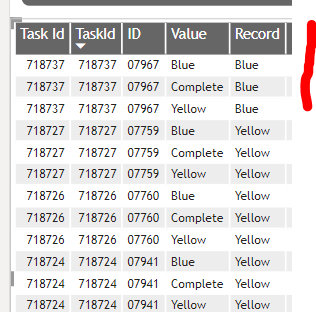
It has added a row in for each scenerio. In the below screenshot you can see that Task ID 718737 has a record of blue only but the calculated column has forced three rows with each scenario instead of highlighting 'Blue' only.
Any suggestions as to why this isnt working
Can you post a shot of the calculated table from the Data view, and also any relationships you've created between the new table and the original. Also, which tables are the columns in your visual coming from ?
I have just created a relationship between both Task ID columns and this is working perfect now.
Thank you very much!
| User | Count |
|---|---|
| 23 | |
| 19 | |
| 17 | |
| 17 | |
| 12 |
| User | Count |
|---|---|
| 60 | |
| 55 | |
| 47 | |
| 42 | |
| 37 |