cancel
Showing results for 
Search instead for 
Did you mean: 

We've captured the moments from FabCon & SQLCon that everyone is talking about, and we are bringing them to the community, live and on-demand. Starts on April 14th. Register now

Reply
Anonymous
Not applicable

Identification Record Check

Hello


I have a table which consists of IDs that have two record types (blue or yellow). I want to create a calcualted column that does the following:


If ID has 'Blue' & 'Yellow' record state "Complete"

If ID has only 'Blue' record state "Blue"

If ID has only 'Yellow' record state "Yellow"


Dataset Example

IDRecord
1Yellow
1Blue
2Yellow
3Yellow
3Blue
4Yellow
5Blue


Expected Outcome

IDCalculated Column
1Complete
2Yellow
3Complete
4Yellow
5Blue


1 ACCEPTED SOLUTION
johnt75
Super User
Super User

You can create a calculated table like

Table 2 = 
var allBlue = CALCULATETABLE( VALUES('Table (2)'[ID]),'Table (2)'[Record] = "Blue")
var allYellow = CALCULATETABLE( VALUES('Table (2)'[ID]),'Table (2)'[Record] = "Yellow")
return UNION( 
    GENERATE( INTERSECT( allBlue, allYellow), { "Complete" }),
    GENERATE( EXCEPT( allBlue, allYellow), { "Blue" }),
    GENERATE( EXCEPT( allYellow, allBlue), { "Yellow" } )
)

View solution in original post

4 REPLIES 4
johnt75
Super User
Super User

You can create a calculated table like

Table 2 = 
var allBlue = CALCULATETABLE( VALUES('Table (2)'[ID]),'Table (2)'[Record] = "Blue")
var allYellow = CALCULATETABLE( VALUES('Table (2)'[ID]),'Table (2)'[Record] = "Yellow")
return UNION( 
    GENERATE( INTERSECT( allBlue, allYellow), { "Complete" }),
    GENERATE( EXCEPT( allBlue, allYellow), { "Blue" }),
    GENERATE( EXCEPT( allYellow, allBlue), { "Yellow" } )
)
Anonymous
Not applicable

Thanks for your response. I have created a calculated table as suggested but instead of highlighting Task ID's that have either of the following:


Yellow & Blue record

Yellow only record

Blue only record


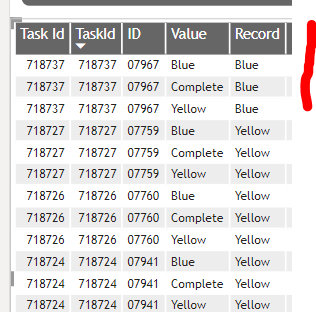
It has added a row in for each scenerio. In the below screenshot you can see that Task ID 718737 has a record of blue only but the calculated column has forced three rows with each scenario instead of highlighting 'Blue' only.

Serdet_0-1655190364190.png


Any suggestions as to why this isnt working

Can you post a shot of the calculated table from the Data view, and also any relationships you've created between the new table and the original. Also, which tables are the columns in your visual coming from ?

Anonymous
Not applicable

I have just created a relationship between both Task ID columns and this is working perfect now.


Thank you very much!

Helpful resources

Announcements
New to Fabric survey Carousel

New to Fabric Survey

If you have recently started exploring Fabric, we'd love to hear how it's going. Your feedback can help with product improvements.

Power BI DataViz World Championships carousel

Power BI DataViz World Championships - June 2026

A new Power BI DataViz World Championship is coming this June! Don't miss out on submitting your entry.

Join our Fabric User Panel

Join our Fabric User Panel

Share feedback directly with Fabric product managers, participate in targeted research studies and influence the Fabric roadmap.

March Power BI Update Carousel

Power BI Community Update - March 2026

Check out the March 2026 Power BI update to learn about new features.