
Get certified for free when you join Fabric Data Days 2026 and dive into Fabric, Power BI, SQL, AI, and other essential data skills.
Join nowTry your skills in the Power BI Dataviz World Championship! Round one ends June 26. Join now
Hello Community,
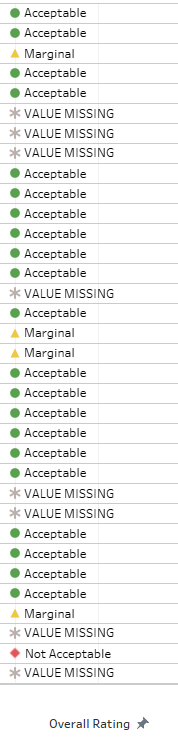
I am trying to add the icon to my column SP data feed matrix [OVERALL_RATING] which have 4 value
Solved! Go to Solution.
Hi @Anonymous
I noticed that you didn't add the "" to include the text Acceptable,Marginal...in the dax expression.
Here's icon formatting post probably could be your reference:
https://community.powerbi.com/t5/Desktop/Icons-Color-formatting/m-p/747856
https://exceleratorbi.com.au/conditional-formatting-using-icons-in-power-bi/
If the problem still exists, Would you mind kindly share your dummy pbix? please make sure you've removed the confidential info before.I'd like to check it further.
In the format option of matrix visual, you have an option for icons under conditional formatting. Choose that and check advance option, if that can help.
Or refer
https://community.powerbi.com/t5/Desktop/Icons-Color-formatting/td-p/747856
Appreciate your Kudos. In case, this is the solution you are looking for, mark it as the Solution. In case it does not help, please provide additional information and mark me with @
Thanks. My Recent Blog -
https://community.powerbi.com/t5/Community-Blog/Winner-Topper-on-Map-How-to-Color-States-on-a-Map-wi...
https://community.powerbi.com/t5/Community-Blog/HR-Analytics-Active-Employee-Hire-and-Termination-tr...
https://community.powerbi.com/t5/Community-Blog/Power-BI-Working-with-Non-Standard-Time-Periods/ba-p...
https://community.powerbi.com/t5/Community-Blog/Comparing-Data-Across-Date-Ranges/ba-p/823601
@amitchandak Thank you so much for your reply however I am trying to do conditional formatting using a text instead of whole number, I tried to copy exact the code and only change the color format but it will give me trouble.
Here is my updated DAX it have the error code "The syntax for 'data' is incorrect"
Hi @Anonymous
I noticed that you didn't add the "" to include the text Acceptable,Marginal...in the dax expression.
Here's icon formatting post probably could be your reference:
https://community.powerbi.com/t5/Desktop/Icons-Color-formatting/m-p/747856
https://exceleratorbi.com.au/conditional-formatting-using-icons-in-power-bi/
If the problem still exists, Would you mind kindly share your dummy pbix? please make sure you've removed the confidential info before.I'd like to check it further.
Don't miss out on Data Days, June 15 through August 7. Learn Fabric, Power BI, SQL, AI and more.
Check out the May 2026 Power BI update to learn about new features.
| User | Count |
|---|---|
| 22 | |
| 22 | |
| 21 | |
| 20 | |
| 12 |
| User | Count |
|---|---|
| 58 | |
| 55 | |
| 41 | |
| 36 | |
| 35 |