Join us at FabCon Atlanta from March 16 - 20, 2026, for the ultimate Fabric, Power BI, AI and SQL community-led event. Save $200 with code FABCOMM.
Register now!The Power BI Data Visualization World Championships is back! Get ahead of the game and start preparing now! Learn more
Dear colleagues,
I am trying to do something which is straight forward (SAP user) but it is not allowing me in PBI and I would appreciate the help here please:
I am counting hot-spots when they have had more than 11 incidents. The first stage is to apply an IF formula to determine the number as below
hot spot = IF([13 Period Indicent]>11,1,0)
I now want to know a sum of these 1's but however i try this PBI won't allow me.
Seemingly such a simple issue and SAP allows the use of where condition and typically i would use:
sum(hotspot) Where ([hotspot] = 1)
any help would be appreciated
kind regards
james
Hi @JConnol4,
I recreated another new file using the older version of Power BI desktop. Please try to open it again. And for the functionCALENDARAUTO, you can refer to the oneline document.
Please notice here we need create relationship between dimtime and the fact table based on the date column.
Regards,
Frank
Hi Frank
Thanks for all the effort and sorry for my nagging today.
i did everything you noted and it is still not working. I believe this is due to the relationships as you specified 1-1 in both directions, but the issue is that i have multiple incidents on the same day, therefore multiple same dates so it isn't working.
I amended your IF2 version so that two of the incident counts were on the same day and it failed.
Is there a solution to this issue at all please?
many thanks and regards
james
Hi,
Share data in a format that can be pasted in Excel.
Hi @JConnol4,
Kindly share your sample data and your formulas if the sample doesn't meet your requirement.
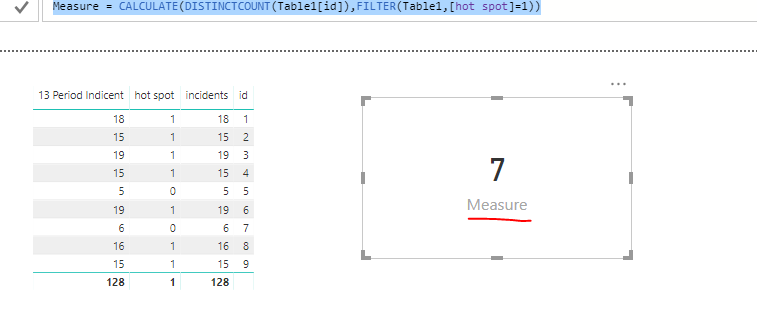
13 Period Indicent = CALCULATE(SUM(Table1[incidents]),ALLEXCEPT(Table1,Table1[id]))
hot spot = IF([13 Period Indicent]>11,1,0)
Measure = CALCULATE(DISTINCTCOUNT(Table1[id]),FILTER(Table1,[hot spot]=1))
For more details, please check the pbix as attached.
Regards,
Frank
Hi Frank,
Thanks very much for the email mate. I have tried to do this but i have not succeeded. The issue maybe due to me not having any of these included within the base data table. At present they are all measures and my base data is not any sort of pivot it is merely just rows of incident data. Unfortunately i can't share it on here for you to see but it is date of incident - location - inc type - count.
My formulas/processes at present are as such:
1) Sum my incidents in a 13 periodbasis (1 year) by using a measure
13 Period Indicent = CALCULATE(SUM('TRUST and SMIS'[Count]),DATESINPERIOD('TRUST and SMIS'[Incident Date],Date(2018,08,19),-365,day))
2) Next i calculate if this is over 11 incidents
hot spot = IF([13 Period Indicent]>11,1,0)
it is here that the tables are not recognising the information - should i add this to the base data or create a new table on this?
I will try again today so any help is appreciated
once again thanks
james
Hi @JConnol4,
We need create a dimtime table in advance.
dimtime = CALENDARAUTO()
In your formula [13 Period Indicent], that should be a static value. If you want to get the total sum of previous year, you should update the formula, Please check the new one.
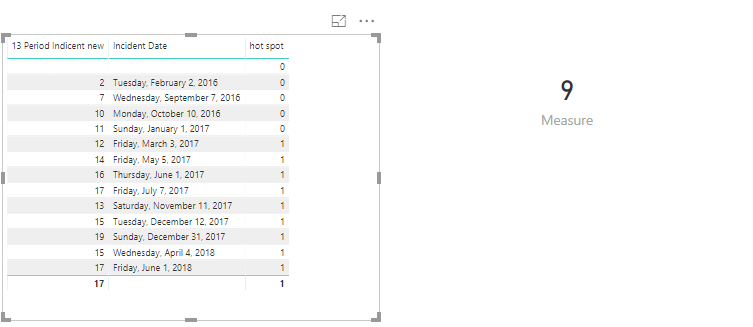
13 Period Indicent new = CALCULATE(SUM('TRUST and SMIS'[Count]),DATESINPERIOD(dimtime[Date],MAX('TRUST and SMIS'[Incident Date]),-365,day))
Then we can create the measures as below.
hot spot = IF([13 Period Indicent new]>11,1,0)
Measure = SUMX('TRUST and SMIS',[hot spot])
For more details, please check the pbix as attached.
Regards,
Frank
The Power BI Data Visualization World Championships is back! Get ahead of the game and start preparing now!
| User | Count |
|---|---|
| 40 | |
| 37 | |
| 33 | |
| 29 | |
| 27 |
| User | Count |
|---|---|
| 133 | |
| 104 | |
| 61 | |
| 59 | |
| 55 |