FabCon is coming to Atlanta
Join us at FabCon Atlanta from March 16 - 20, 2026, for the ultimate Fabric, Power BI, AI and SQL community-led event. Save $200 with code FABCOMM.
Register now!- Power BI forums
- Get Help with Power BI
- Desktop
- Service
- Report Server
- Power Query
- Mobile Apps
- Developer
- DAX Commands and Tips
- Custom Visuals Development Discussion
- Health and Life Sciences
- Power BI Spanish forums
- Translated Spanish Desktop
- Training and Consulting
- Instructor Led Training
- Dashboard in a Day for Women, by Women
- Galleries
- Data Stories Gallery
- Themes Gallery
- Contests Gallery
- QuickViz Gallery
- Quick Measures Gallery
- Visual Calculations Gallery
- Notebook Gallery
- Translytical Task Flow Gallery
- TMDL Gallery
- R Script Showcase
- Webinars and Video Gallery
- Ideas
- Custom Visuals Ideas (read-only)
- Issues
- Issues
- Events
- Upcoming Events
Get Fabric Certified for FREE during Fabric Data Days. Don't miss your chance! Request now
- Power BI forums
- Forums
- Get Help with Power BI
- Desktop
- Re: I want one column to be defined by two other c...
- Subscribe to RSS Feed
- Mark Topic as New
- Mark Topic as Read
- Float this Topic for Current User
- Bookmark
- Subscribe
- Printer Friendly Page

- Mark as New
- Bookmark
- Subscribe
- Mute
- Subscribe to RSS Feed
- Permalink
- Report Inappropriate Content
I want one column to be defined by two other columns
I have one column as EmployeeId, and another column as Month, and another as TargetAchievers,
TargetAchievers value is 1 if Achieved and 0 if not.
Now the EmployeeId is unique but it repeats monthly.
I want to know how many employees achieved every month successively.
Please help, also I hope this defines my issue completely


- Mark as New
- Bookmark
- Subscribe
- Mute
- Subscribe to RSS Feed
- Permalink
- Report Inappropriate Content
Hi @nrungta
Let me know if you'd like to get below results:
Measure = CALCULATE(DISTINCTCOUNT('Table'[EmployeeID]),FILTER(ALL('Table'),[TargetAchievers]=1),VALUES('Table'[Month]))
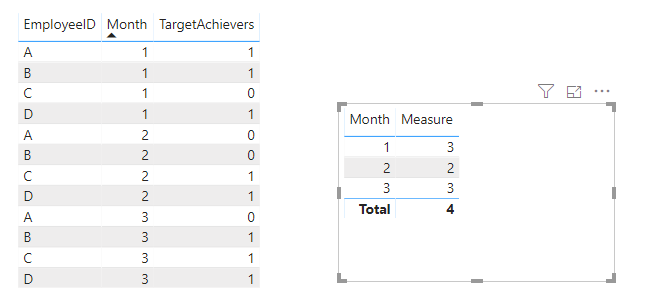
Pbix attached.
If this post helps, then please consider Accept it as the solution to help the other members find it more
quickly.
- Mark as New
- Bookmark
- Subscribe
- Mute
- Subscribe to RSS Feed
- Permalink
- Report Inappropriate Content
This is not the solution @v-diye-msft
Taking your version, If you see
A is TargetAchievers = 1 time
B is TargetAchievers = 2 times
C is TargetAchievers = 2 times
D is TargetAchievers = 3 times
Now as you can see B and C both Achieved 2 times.
The solution I require is where I can click on this number 2 and my whole visualisation drills down on the basis of this, i.e., show drilled data of only B and C.
- Mark as New
- Bookmark
- Subscribe
- Mute
- Subscribe to RSS Feed
- Permalink
- Report Inappropriate Content
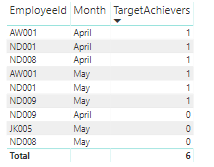
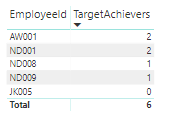
Now the Maximum any EmployeeID can get is total 2, then 1 then 0.
There are 2 employees who have got 2, (meaning they have achieved the target successfully in both months).
How do I Visualise my whole other data, just on this number 2, i.e, all other visualisations should drill-down to only these two Employees.


- Mark as New
- Bookmark
- Subscribe
- Mute
- Subscribe to RSS Feed
- Permalink
- Report Inappropriate Content
Hi,
Share some data and show the expected result.
Regards,
Ashish Mathur
http://www.ashishmathur.com
https://www.linkedin.com/in/excelenthusiasts/


- Mark as New
- Bookmark
- Subscribe
- Mute
- Subscribe to RSS Feed
- Permalink
- Report Inappropriate Content
Do show data and an example and everything will be easier and quicker. If you want the number of employees per year:
1. Place year in a table visual
2. Place this measure in the visual (it assumes you want a 1 in all 12 months for the employee)
Measure =
SUMX (
    DISTINCT ( Table1[ID] ),
    INT ( CALCULATE ( SUM ( Table1[TargetAchievers] ) ) = 12 )
)
Please mark the question solved when done and consider giving kudos if posts are helpful.
Cheers 
- Mark as New
- Bookmark
- Subscribe
- Mute
- Subscribe to RSS Feed
- Permalink
- Report Inappropriate Content
Hi @nrungta
Try this
1. Place Month in the rows of a table visual
2. Place this measure in the visual:
Measure = SUM( Table1[TargetAchievers] )
Please mark the question solved when done and consider giving kudos if posts are helpful.
Cheers
- Mark as New
- Bookmark
- Subscribe
- Mute
- Subscribe to RSS Feed
- Permalink
- Report Inappropriate Content
Hi @AlB ,
This is not solving my issue. I already have a table for TargetAchievers whose sum will give the same result.
I want to know how many EmployeeIDs achieved the target successively every month,
Suppose in a year it can go Max till 12 only.
How do I drill down all my visuals to the number 12.

Helpful resources

Power BI Monthly Update - November 2025
Check out the November 2025 Power BI update to learn about new features.

Fabric Data Days
Advance your Data & AI career with 50 days of live learning, contests, hands-on challenges, study groups & certifications and more!

FabCon Atlanta 2026
Join us at FabCon Atlanta, March 16-20, for the ultimate Fabric, Power BI, AI and SQL community-led event. Save $200 with code FABCOMM.


