
Join us at FabCon Atlanta from March 16 - 20, 2026, for the ultimate Fabric, Power BI, AI and SQL community-led event. Save $200 with code FABCOMM.
Register now!The Power BI Data Visualization World Championships is back! Get ahead of the game and start preparing now! Learn more
Hi
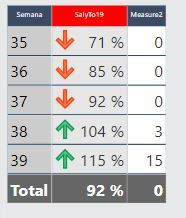
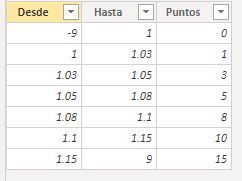
wanna have a measure that allows to calculate the number of "points" u win if your percentage is in a specific range for example for week 35 my percentage is 71%, this number is beetween -9 and 1 so i won 0 points. Also, my Total should give the summ of points won so far
i accomplished the first part by using this measure:
CALCULATE(VALUES(Scorecard[Puntos]),FILTER(Scorecard,[SalyTo19]>=Scorecard[Desde]&&[SalyTo19]<Scorecard[Hasta]))
however the GrandTotal is not giving me the right number so after reading a lot of similar posts i tryed to use this other measure:
IF(HASONEFILTER(Table1[Week]),
Solved! Go to Solution.
Hi @Anonymous
AssumingTable1[Semana] is what you have in the rows of the visual shown:
Measure =
SUMX (
DISTINCT ( Table1[Semana] ),
CALCULATE (
VALUES ( Scorecard[Puntos] ),
FILTER (
Scorecard,
[SalyTo19] >= Scorecard[Desde] && [SalyTo19] < Scorecard[Hasta]
)
)
)
Please mark the question solved when done and consider giving kudos if posts are helpful.
Cheers ![]()
Hi @Anonymous
AssumingTable1[Semana] is what you have in the rows of the visual shown:
Measure =
SUMX (
DISTINCT ( Table1[Semana] ),
CALCULATE (
VALUES ( Scorecard[Puntos] ),
FILTER (
Scorecard,
[SalyTo19] >= Scorecard[Desde] && [SalyTo19] < Scorecard[Hasta]
)
)
)
Please mark the question solved when done and consider giving kudos if posts are helpful.
Cheers ![]()
@AlB hi, i just added the Month Row, so now i have Month and week but the month is not adding the amounts of each week subtotal,
any ideas?
You need to add the month in the measure too:
Measure =
SUMX (
SUMMARIZE ( Table1,Table1[Month], Table1[Semana] ),
CALCULATE (
VALUES ( Scorecard[Puntos] ),
FILTER (
Scorecard,
[SalyTo19] >= Scorecard[Desde] && [SalyTo19] < Scorecard[Hasta]
)
)
)
Please mark the question solved when done and consider giving kudos if posts are helpful.
Cheers ![]()
thanks!
The Power BI Data Visualization World Championships is back! Get ahead of the game and start preparing now!
| User | Count |
|---|---|
| 39 | |
| 35 | |
| 33 | |
| 32 | |
| 27 |
| User | Count |
|---|---|
| 136 | |
| 96 | |
| 77 | |
| 67 | |
| 65 |