FabCon is coming to Atlanta
Join us at FabCon Atlanta from March 16 - 20, 2026, for the ultimate Fabric, Power BI, AI and SQL community-led event. Save $200 with code FABCOMM.
Register now!- Power BI forums
- Get Help with Power BI
- Desktop
- Service
- Report Server
- Power Query
- Mobile Apps
- Developer
- DAX Commands and Tips
- Custom Visuals Development Discussion
- Health and Life Sciences
- Power BI Spanish forums
- Translated Spanish Desktop
- Training and Consulting
- Instructor Led Training
- Dashboard in a Day for Women, by Women
- Galleries
- Data Stories Gallery
- Themes Gallery
- Contests Gallery
- QuickViz Gallery
- Quick Measures Gallery
- Visual Calculations Gallery
- Notebook Gallery
- Translytical Task Flow Gallery
- TMDL Gallery
- R Script Showcase
- Webinars and Video Gallery
- Ideas
- Custom Visuals Ideas (read-only)
- Issues
- Issues
- Events
- Upcoming Events
The Power BI Data Visualization World Championships is back! Get ahead of the game and start preparing now! Learn more
- Power BI forums
- Forums
- Get Help with Power BI
- Desktop
- Re: I want one column to be defined by two other c...
- Subscribe to RSS Feed
- Mark Topic as New
- Mark Topic as Read
- Float this Topic for Current User
- Bookmark
- Subscribe
- Printer Friendly Page

- Mark as New
- Bookmark
- Subscribe
- Mute
- Subscribe to RSS Feed
- Permalink
- Report Inappropriate Content
I want one column to be defined by two other columns
I have one column as EmployeeId, and another column as Month, and another as TargetAchievers,
TargetAchievers value is 1 if Achieved and 0 if not.
Now the EmployeeId is unique but it repeats monthly.
I want to know how many employees achieved every month successively.
Please help, also I hope this defines my issue completely


- Mark as New
- Bookmark
- Subscribe
- Mute
- Subscribe to RSS Feed
- Permalink
- Report Inappropriate Content
Hi @nrungta
Let me know if you'd like to get below results:
Measure = CALCULATE(DISTINCTCOUNT('Table'[EmployeeID]),FILTER(ALL('Table'),[TargetAchievers]=1),VALUES('Table'[Month]))
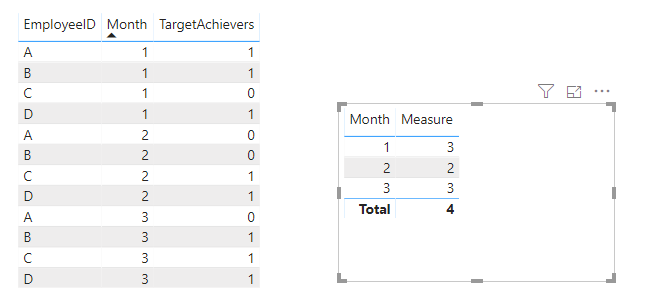
Pbix attached.
If this post helps, then please consider Accept it as the solution to help the other members find it more
quickly.
- Mark as New
- Bookmark
- Subscribe
- Mute
- Subscribe to RSS Feed
- Permalink
- Report Inappropriate Content
This is not the solution @v-diye-msft
Taking your version, If you see
A is TargetAchievers = 1 time
B is TargetAchievers = 2 times
C is TargetAchievers = 2 times
D is TargetAchievers = 3 times
Now as you can see B and C both Achieved 2 times.
The solution I require is where I can click on this number 2 and my whole visualisation drills down on the basis of this, i.e., show drilled data of only B and C.
- Mark as New
- Bookmark
- Subscribe
- Mute
- Subscribe to RSS Feed
- Permalink
- Report Inappropriate Content
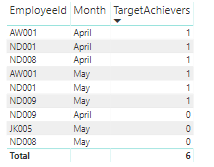
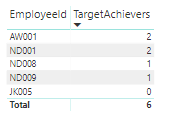
Now the Maximum any EmployeeID can get is total 2, then 1 then 0.
There are 2 employees who have got 2, (meaning they have achieved the target successfully in both months).
How do I Visualise my whole other data, just on this number 2, i.e, all other visualisations should drill-down to only these two Employees.


- Mark as New
- Bookmark
- Subscribe
- Mute
- Subscribe to RSS Feed
- Permalink
- Report Inappropriate Content
Hi,
Share some data and show the expected result.
Regards,
Ashish Mathur
http://www.ashishmathur.com
https://www.linkedin.com/in/excelenthusiasts/


- Mark as New
- Bookmark
- Subscribe
- Mute
- Subscribe to RSS Feed
- Permalink
- Report Inappropriate Content
Do show data and an example and everything will be easier and quicker. If you want the number of employees per year:
1. Place year in a table visual
2. Place this measure in the visual (it assumes you want a 1 in all 12 months for the employee)
Measure =
SUMX (
    DISTINCT ( Table1[ID] ),
    INT ( CALCULATE ( SUM ( Table1[TargetAchievers] ) ) = 12 )
)
Please mark the question solved when done and consider giving kudos if posts are helpful.
Cheers 
- Mark as New
- Bookmark
- Subscribe
- Mute
- Subscribe to RSS Feed
- Permalink
- Report Inappropriate Content
Hi @nrungta
Try this
1. Place Month in the rows of a table visual
2. Place this measure in the visual:
Measure = SUM( Table1[TargetAchievers] )
Please mark the question solved when done and consider giving kudos if posts are helpful.
Cheers
- Mark as New
- Bookmark
- Subscribe
- Mute
- Subscribe to RSS Feed
- Permalink
- Report Inappropriate Content
Hi @AlB ,
This is not solving my issue. I already have a table for TargetAchievers whose sum will give the same result.
I want to know how many EmployeeIDs achieved the target successively every month,
Suppose in a year it can go Max till 12 only.
How do I drill down all my visuals to the number 12.

Helpful resources

Power BI Dataviz World Championships
The Power BI Data Visualization World Championships is back! Get ahead of the game and start preparing now!

Power BI Monthly Update - November 2025
Check out the November 2025 Power BI update to learn about new features.

FabCon Atlanta 2026
Join us at FabCon Atlanta, March 16-20, for the ultimate Fabric, Power BI, AI and SQL community-led event. Save $200 with code FABCOMM.

| User | Count |
|---|---|
| 59 | |
| 46 | |
| 42 | |
| 23 | |
| 18 |


| User | Count |
|---|---|
| 193 | |
| 124 | |
| 101 | |
| 67 | |
| 49 |


