Join us at FabCon Atlanta from March 16 - 20, 2026, for the ultimate Fabric, Power BI, AI and SQL community-led event. Save $200 with code FABCOMM.
Register now!The Power BI Data Visualization World Championships is back! It's time to submit your entry. Live now!
I have been banging my head against this for a little bit, and the crazy part is I have gotten it to work before but cant figure it out again.
I have a table in an excel file that has 20ish columns, one of them being a URL column that is a concat of a base string and another column. I store this excel file in SharePoint, and then access it from PowerBi. After loading in all my data, I cant make the URL column's data render as a clickable URL. Right clicking the data column does not have the "Web URL" format type (not even grayed out, its not there at all). So I am at a loss, and I am not sure what I am doing wrong.
As I mentioned, I have gotten this to work before in a very similar project. I have gone through all the settings side by side and they appear identicle.
Solved! Go to Solution.
Hi @jordanberry89,
I test on my side and it can be recognized as hyperlink and open it on web browser.
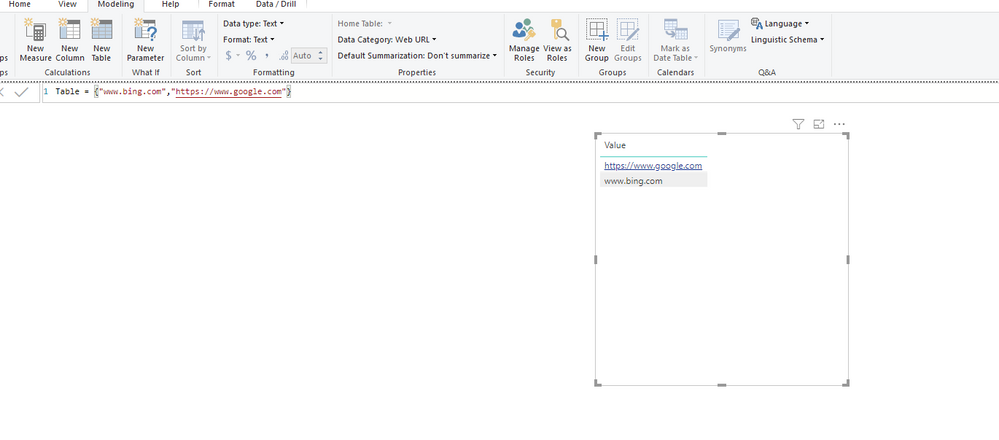
Please add "https//" prefix to your url string and set up 'Date Category' to 'web url' enable hyperlink feature, otherwise power bi will recognize it as normal text string.
Regards,
Xiaoxin Sheng
Hi @jordanberry89,
I test on my side and it can be recognized as hyperlink and open it on web browser.
Please add "https//" prefix to your url string and set up 'Date Category' to 'web url' enable hyperlink feature, otherwise power bi will recognize it as normal text string.
Regards,
Xiaoxin Sheng
Hey @Anonymous,
Thank you for your help! I had the https:// added to the string, but what I was missing was setting the data category in the modeling view. The way I was trying to do it was going to the dataset and trying to cast it to a web url from a string.
My dashboard is working as expected now! I will make your post as the answer.
The Power BI Data Visualization World Championships is back! It's time to submit your entry.
Check out the January 2026 Power BI update to learn about new features.
| User | Count |
|---|---|
| 56 | |
| 42 | |
| 41 | |
| 21 | |
| 21 |
| User | Count |
|---|---|
| 150 | |
| 106 | |
| 65 | |
| 36 | |
| 36 |