We've captured the moments from FabCon & SQLCon that everyone is talking about, and we are bringing them to the community, live and on-demand. Starts on April 14th. Register now
I have been banging my head against this for a little bit, and the crazy part is I have gotten it to work before but cant figure it out again.
I have a table in an excel file that has 20ish columns, one of them being a URL column that is a concat of a base string and another column. I store this excel file in SharePoint, and then access it from PowerBi. After loading in all my data, I cant make the URL column's data render as a clickable URL. Right clicking the data column does not have the "Web URL" format type (not even grayed out, its not there at all). So I am at a loss, and I am not sure what I am doing wrong.
As I mentioned, I have gotten this to work before in a very similar project. I have gone through all the settings side by side and they appear identicle.
Solved! Go to Solution.
Hi @jordanberry89,
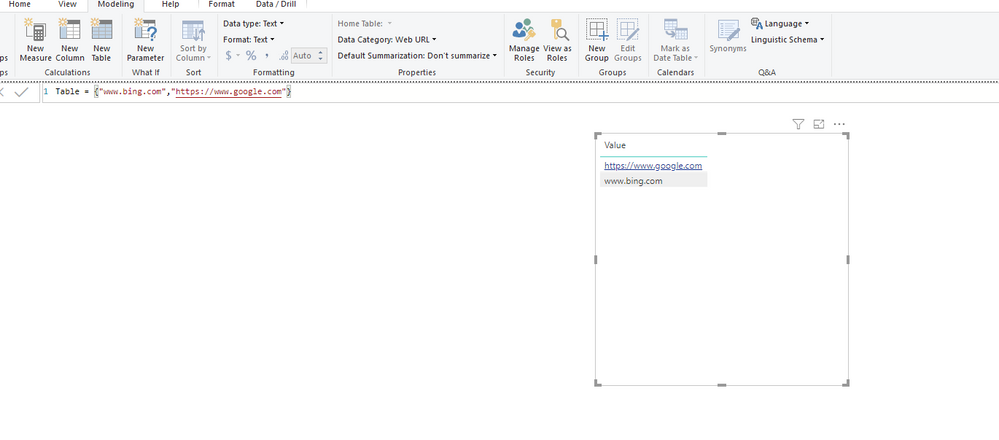
I test on my side and it can be recognized as hyperlink and open it on web browser.
Please add "https//" prefix to your url string and set up 'Date Category' to 'web url' enable hyperlink feature, otherwise power bi will recognize it as normal text string.
Regards,
Xiaoxin Sheng
Hi @jordanberry89,
I test on my side and it can be recognized as hyperlink and open it on web browser.
Please add "https//" prefix to your url string and set up 'Date Category' to 'web url' enable hyperlink feature, otherwise power bi will recognize it as normal text string.
Regards,
Xiaoxin Sheng
Hey @Anonymous,
Thank you for your help! I had the https:// added to the string, but what I was missing was setting the data category in the modeling view. The way I was trying to do it was going to the dataset and trying to cast it to a web url from a string.
My dashboard is working as expected now! I will make your post as the answer.
If you have recently started exploring Fabric, we'd love to hear how it's going. Your feedback can help with product improvements.
A new Power BI DataViz World Championship is coming this June! Don't miss out on submitting your entry.
| User | Count |
|---|---|
| 56 | |
| 40 | |
| 36 | |
| 18 | |
| 18 |
| User | Count |
|---|---|
| 70 | |
| 67 | |
| 38 | |
| 34 | |
| 23 |