Join us in Barcelona for FabCon and SQLCon, September 28 - October 1, 2026.
This is best Fabric, Power BI, SQL and AI community event. How do we know? The last event sold out! Save €200 with code FABCMTY200.
Register now- Power BI forums
- Get Help with Power BI
- Desktop
- Service
- Report Server
- Power Query
- Mobile Apps
- Developer
- DAX Commands and Tips
- Custom Visuals Development Discussion
- Health and Life Sciences
- Power BI Spanish forums
- Translated Spanish Desktop
- Training and Consulting
- Instructor Led Training
- Dashboard in a Day for Women, by Women
- Galleries
- Data Stories Gallery
- Themes Gallery
- Contests Gallery
- QuickViz Gallery
- Quick Measures Gallery
- Visual Calculations Gallery
- Fabric Apps Gallery
- Notebook Gallery
- Translytical Task Flow Gallery
- TMDL Gallery
- R Script Showcase
- Webinars and Video Gallery
- Ideas
- Custom Visuals Ideas (read-only)
- Issues
- Issues
- Events
- Upcoming Events
The Fabric community is upgrading! Read all of the details including the timeline and what you can expect. Learn more
- Power BI forums
- Forums
- Get Help with Power BI
- Desktop
- Re: How to write specific date column?
- Subscribe to RSS Feed
- Mark Topic as New
- Mark Topic as Read
- Float this Topic for Current User
- Bookmark
- Subscribe
- Printer Friendly Page


- Mark as New
- Bookmark
- Subscribe
- Mute
- Subscribe to RSS Feed
- Permalink
- Report Inappropriate Content
How to write specific date column?
Hi,
I made a Date table as following.
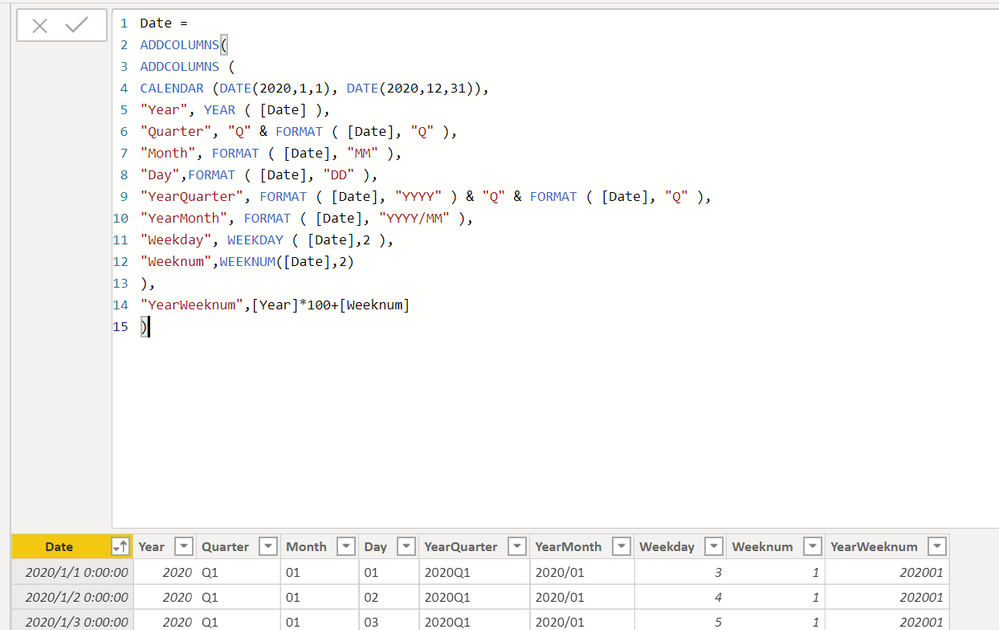
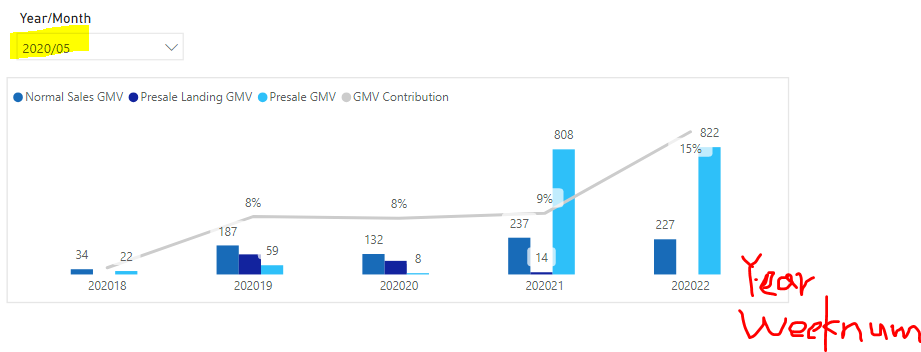
When select a YearMonth such as 2020/05, the visual will show its YearWeeknum.
However, I also want it show these YearWeeknum belongs to which date.
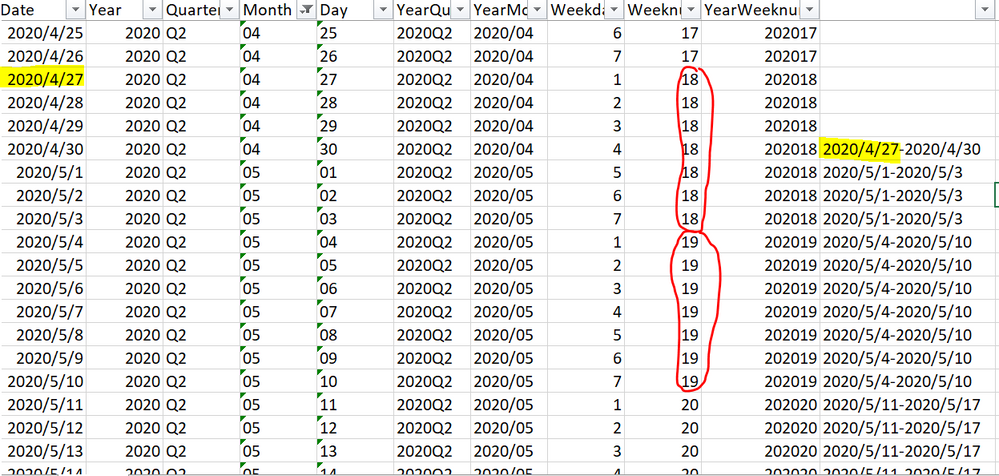
So I want to write a new column like the following:
For example, when select YearMonth 202005, it should be 2020/5/1-2020/5/3 (which is YearWeeknum 202018 in the previous bar chart.), 2020/5/4-2020/5/10, 2020/5/11-2020/5/17........
Anyone know how to write this new column in power bi?
Thanks a lot for your time!
Solved! Go to Solution.

- Mark as New
- Bookmark
- Subscribe
- Mute
- Subscribe to RSS Feed
- Permalink
- Report Inappropriate Content
Hi, @YunJ
I'd like to suggest you create a calculated column as below. The pbix file is attached in the end.
DateDuration =
var _min =
CALCULATE(
    MIN('Date'[Date]),
    FILTER(
        ALL('Date'),
        'Date'[YearWeeknum]=EARLIER('Date'[YearWeeknum])&&
        'Date'[Month]=EARLIER('Date'[Month])
    )
)
var _max =
CALCULATE(
    MAX('Date'[Date]),
    FILTER(
        ALL('Date'),
        'Date'[YearWeeknum]=EARLIER('Date'[YearWeeknum])&&
        'Date'[Month]=EARLIER('Date'[Month])
    )
)
return
_min&"-"&_max
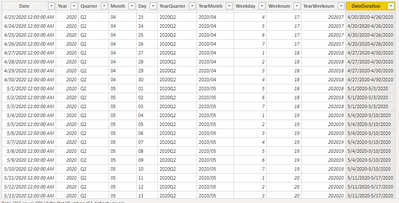
Result:
Best Regards
Allan
If this post helps, then please consider Accept it as the solution to help the other members find it more quickly.
- Mark as New
- Bookmark
- Subscribe
- Mute
- Subscribe to RSS Feed
- Permalink
- Report Inappropriate Content
Hi, @YunJ
I'd like to suggest you create a calculated column as below. The pbix file is attached in the end.
DateDuration =
var _min =
CALCULATE(
    MIN('Date'[Date]),
    FILTER(
        ALL('Date'),
        'Date'[YearWeeknum]=EARLIER('Date'[YearWeeknum])&&
        'Date'[Month]=EARLIER('Date'[Month])
    )
)
var _max =
CALCULATE(
    MAX('Date'[Date]),
    FILTER(
        ALL('Date'),
        'Date'[YearWeeknum]=EARLIER('Date'[YearWeeknum])&&
        'Date'[Month]=EARLIER('Date'[Month])
    )
)
return
_min&"-"&_max
Result:
Best Regards
Allan
If this post helps, then please consider Accept it as the solution to help the other members find it more quickly.
- Mark as New
- Bookmark
- Subscribe
- Mute
- Subscribe to RSS Feed
- Permalink
- Report Inappropriate Content
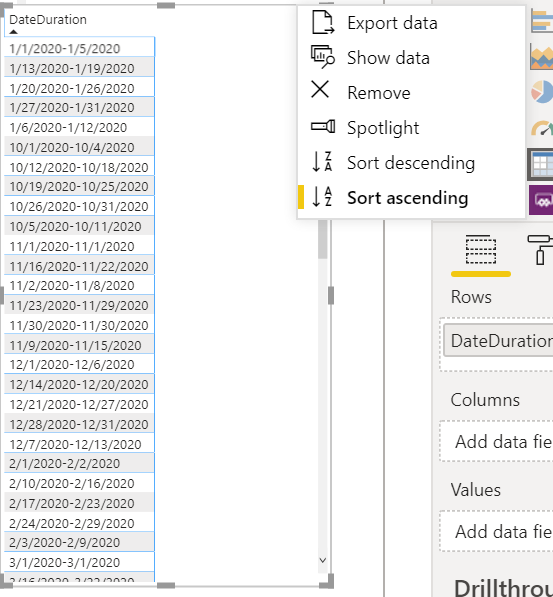
- Mark as New
- Bookmark
- Subscribe
- Mute
- Subscribe to RSS Feed
- Permalink
- Report Inappropriate Content
Hi, @YunJ
I'd like to suggest you modify the calculated table as below.
Date =
ADDCOLUMNS(
    ADDCOLUMNS(
        CALENDAR(DATE(2020,1,1),DATE(2020,12,31)),
        "Year",YEAR([Date]),
        "Quarter","Q"&FORMAT([Date],"Q"),
        "Month",FORMAT([Date],"MM"),
        "Day",FORMAT([Date],"DD"),
        "YearQuarter",FORMAT([Date],"YYYY")&"Q"&FORMAT([Date],"Q"),
        "YearMonth",FORMAT([Date],"YYYY/MM"),
        "Weekday",WEEKDAY([Date],2),
        "Weeknum",WEEKNUM([Date],2)
    ),
    "YearWeeknum",[Year]*100+[Weeknum],
    "YearMonthWeeknum",[Year]*100+[Month]*10+[Weeknum]
)
Then you may make 'DateDuration' column selected, click 'Sort by column' in 'Column tools', sort by 'YearMonthWeeknum'.
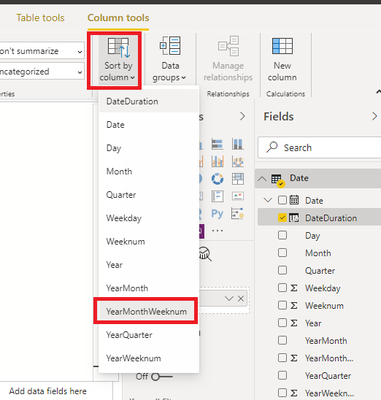
Result:
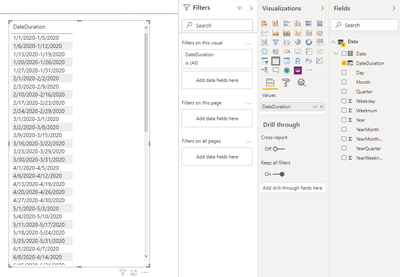
Best Regards
Allan
If this post helps, then please consider Accept it as the solution to help the other members find it more quickly.


- Mark as New
- Bookmark
- Subscribe
- Mute
- Subscribe to RSS Feed
- Permalink
- Report Inappropriate Content
@YunJ , not very clear to me. Do need week start and end date
Week Start date = 'Date'[Date]+-1*WEEKDAY('Date'[Date],2)+1 //Monday start
Week End date = 'Date'[Date]+ 7-1*WEEKDAY('Date'[Date],2)
Week Start date = 'Date'[Date]+-1*WEEKDAY('Date'[Date],2)+1 //Sunday Start
Week End date = 'Date'[Date]+ 7-1*WEEKDAY('Date'[Date],2)
Week name = [Week Start date] & " to "& [Week End date]

- Mark as New
- Bookmark
- Subscribe
- Mute
- Subscribe to RSS Feed
- Permalink
- Report Inappropriate Content
Hi @YunJ ,
Please use the below one:
Measure = CALCULATE(MIN('Table'[Date]),ALL('Table'[Year],'Table'[Quarter],'Table'[Month],'Table'[Day],'Table'[YearQuarter],'Table'[YearMonth],'Table'[Weekday],'Table'[Weeknum],'Table'[Date])) & "-" & CALCULATE(MAX('Table'[Date]),ALL('Table'[Year],'Table'[Quarter],'Table'[Month],'Table'[Day],'Table'[YearQuarter],'Table'[YearMonth],'Table'[Weekday],'Table'[Weeknum],'Table'[Date]))
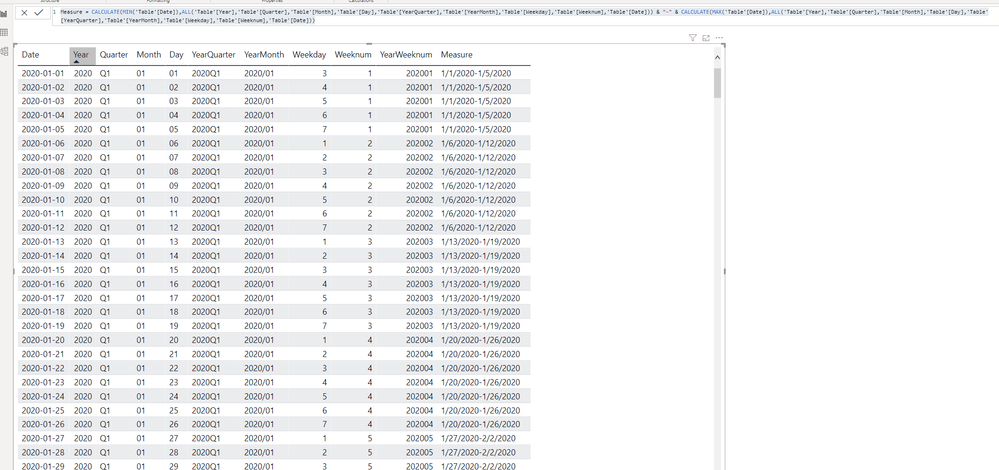
Aiolos Zhao
- Mark as New
- Bookmark
- Subscribe
- Mute
- Subscribe to RSS Feed
- Permalink
- Report Inappropriate Content
Hi @YunJ ,
Create a Column
- Mark as New
- Bookmark
- Subscribe
- Mute
- Subscribe to RSS Feed
- Permalink
- Report Inappropriate Content
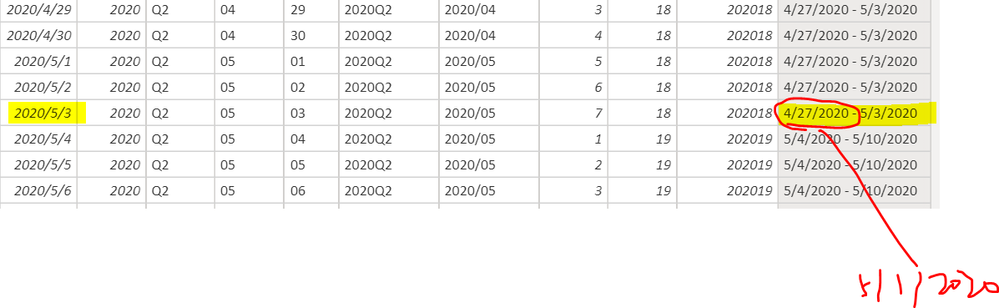
Hi @Anonymous
Thanks for your help.
For example for 2020/5/3, because it belongs to May, so it should be 5/1/2020-5/3/2020. I want it return the start/end start for the month itself.
- Mark as New
- Bookmark
- Subscribe
- Mute
- Subscribe to RSS Feed
- Permalink
- Report Inappropriate Content
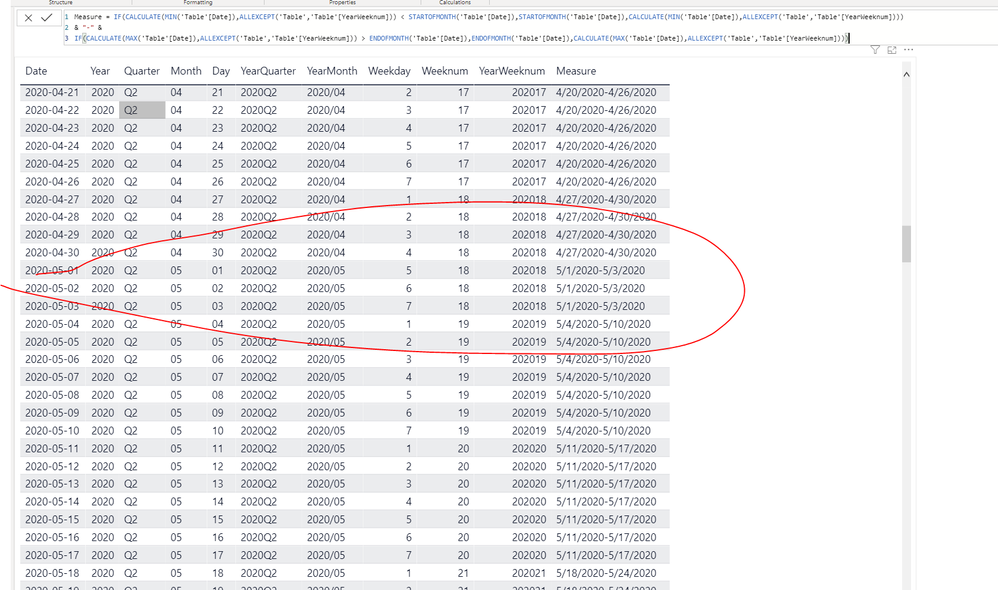
You need a if-else for this:
Measure = IF(CALCULATE(MIN('Table'[Date]),ALLEXCEPT('Table','Table'[YearWeeknum])) < STARTOFMONTH('Table'[Date]),STARTOFMONTH('Table'[Date]),CALCULATE(MIN('Table'[Date]),ALLEXCEPT('Table','Table'[YearWeeknum])))
& "-" &
IF(CALCULATE(MAX('Table'[Date]),ALLEXCEPT('Table','Table'[YearWeeknum])) > ENDOFMONTH('Table'[Date]),ENDOFMONTH('Table'[Date]),CALCULATE(MAX('Table'[Date]),ALLEXCEPT('Table','Table'[YearWeeknum])))
Aiolos Zhao
- Mark as New
- Bookmark
- Subscribe
- Mute
- Subscribe to RSS Feed
- Permalink
- Report Inappropriate Content
Hi @Anonymous
I'm wondering can this be sort in the correct order?
Thanks a lot for your time!
Helpful resources

FabCon & SQLCon – Barcelona 2026
Join us in Barcelona for FabCon and SQLCon, the Fabric, Power BI, SQL, and AI community event. Save €200 with code FABCMTY200.

Power BI DataViz World Championships - June 2026
A new Power BI DataViz World Championship is coming this June! Don't miss out on submitting your entry.

| User | Count |
|---|---|
| 24 | |
| 22 | |
| 20 | |
| 18 | |
| 14 |


| User | Count |
|---|---|
| 45 | |
| 38 | |
| 24 | |
| 22 | |
| 20 |


