cancel
Showing results for 
Search instead for 
Did you mean: 

We've captured the moments from FabCon & SQLCon that everyone is talking about, and we are bringing them to the community, live and on-demand. Starts on April 14th. Register now

Reply
kmpmuthu
Frequent Visitor

How to transfer SQL Hierarchy data type column

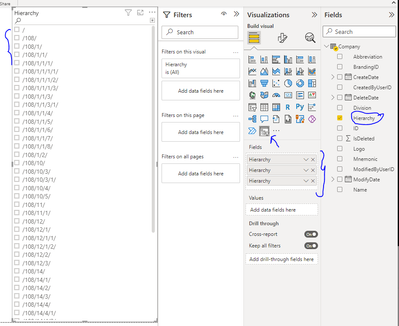
We are using Company master table which is having "Hierarchy" data type column. This column having hierarchical column to parent child relationship. We want to use this hierarchy column in slicer [user select input].  Could you pleae help us how to transform data?


I believe the "Hierarchy " sql data type column could not use as direct data.


Thanks in Advance


3 REPLIES 3
kmpmuthu
Frequent Visitor

Adding more info,


In table "Hierarchy" column itself has hierarchical data. Like this column has Parent and child data. If we are trying to use "Hierarchy Slicer" ,its expecting different column to form parent child data structure.

Hierarchy data type column has 5 level of parent child hierarchical data.

Parent 1

   Child 1

        child 1-1

        child 1-2

    Child 2

    Child 3

    Child 4

         child 4-1

         child 4-2

        child 4-3

        child 4-4

Do we have any visualization can handle same column data for both parent and child hierarchy.

kmpmuthu_0-1652740368958.png


Thanks in Advance

First of all, you should import or compile from HR or whatever system a fundamental table,
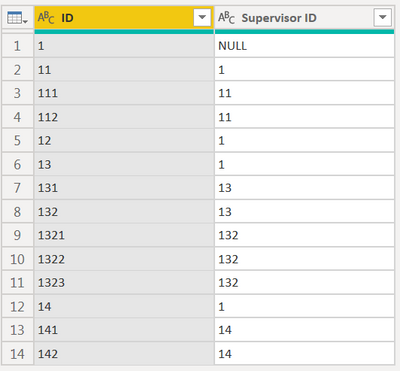
CNENFRNL_0-1652784452346.png

let
    RecursiveHierarchy = (_supID as text, _hierarchy as list) as list => let pos = List.PositionOf(Cols{0}, _supID) in if pos<>-1 then @RecursiveHierarchy(Cols{1}{pos}, {_supID} & _hierarchy) else _hierarchy,
    Source = Table.FromRows(Json.Document(Binary.Decompress(Binary.FromText("VcwxDgAgCAPAvzC7WHiGcXMi/v8bKmLArRdaVKlSoT5ao1k2jqpHyw9IQJQ4ReuzAx/uCY/4yZkSH8Vm4oBjLg==", BinaryEncoding.Base64), Compression.Deflate)), let _t = ((type nullable text) meta [Serialized.Text = true]) in type table [ID = _t, #"Supervisor ID" = _t]),
    Cols = Table.ToColumns(Source),
    #"Added Hierarchy" = Table.AddColumn(Source, "Hierarchy", each Text.Combine(RecursiveHierarchy([#"Supervisor ID"], {}) & {[ID]}, "|")),
    #"Split Column by Delimiter" = Table.SplitColumn(Table.SelectColumns(#"Added Hierarchy", "Hierarchy"), "Hierarchy", Splitter.SplitTextByDelimiter("|", QuoteStyle.Csv), {"Hierarchy.1", "Hierarchy.2", "Hierarchy.3", "Hierarchy.4"})
in
    #"Split Column by Delimiter"
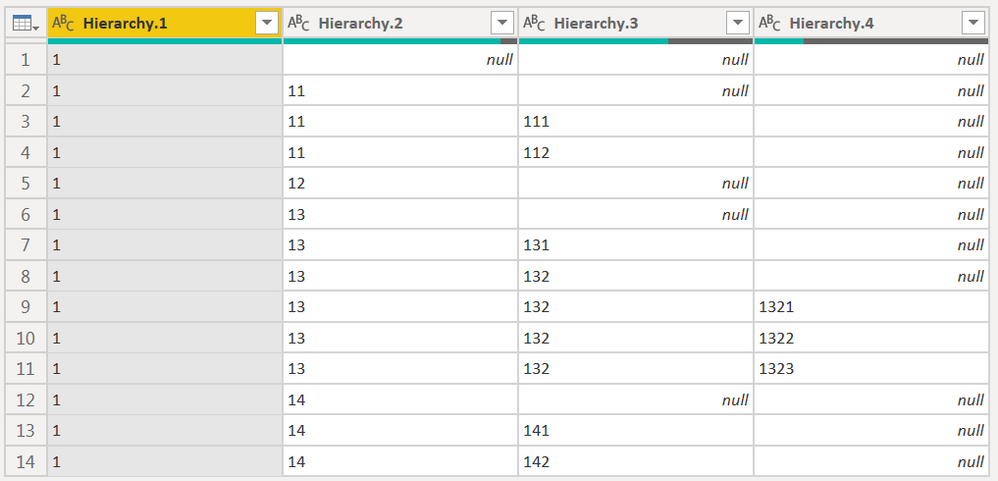
CNENFRNL_1-1652784567755.png


Thanks to the great efforts by MS engineers to simplify syntax of DAX! Most beginners are SUCCESSFULLY MISLED to think that they could easily master DAX; but it turns out that the intricacy of the most frequently used RANKX() is still way beyond their comprehension!

DAX is simple, but NOT EASY!

That's great news. Thanks for your detailed explaination. 

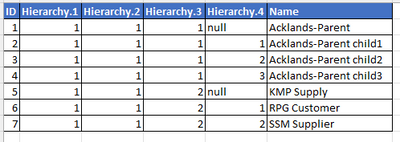
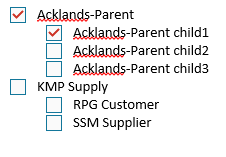
To display to user, can we show different column (another column) instead of hierarchy id's.

kmpmuthu_0-1652890280338.png


kmpmuthu_1-1652890280348.png


Appreciate if you could provide any solution for this. Thanks in Advance.

Helpful resources

Announcements
New to Fabric survey Carousel

New to Fabric Survey

If you have recently started exploring Fabric, we'd love to hear how it's going. Your feedback can help with product improvements.

Power BI DataViz World Championships carousel

Power BI DataViz World Championships - June 2026

A new Power BI DataViz World Championship is coming this June! Don't miss out on submitting your entry.

Join our Fabric User Panel

Join our Fabric User Panel

Share feedback directly with Fabric product managers, participate in targeted research studies and influence the Fabric roadmap.

March Power BI Update Carousel

Power BI Community Update - March 2026

Check out the March 2026 Power BI update to learn about new features.