cancel
Showing results for 
Search instead for 
Did you mean: 

July 7 - July 17 | Round 2 of the Power BI Dataviz World Championships. Don't miss your chance! Learn more

Reply
kmpmuthu
Frequent Visitor

How to transfer SQL Hierarchy data type column

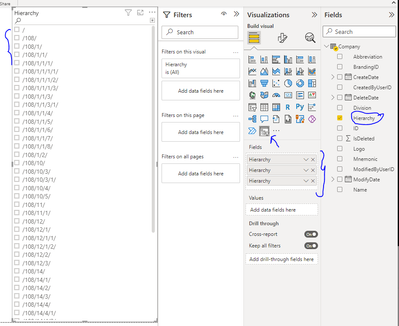
We are using Company master table which is having "Hierarchy" data type column. This column having hierarchical column to parent child relationship. We want to use this hierarchy column in slicer [user select input].  Could you pleae help us how to transform data?


I believe the "Hierarchy " sql data type column could not use as direct data.


Thanks in Advance


3 REPLIES 3
kmpmuthu
Frequent Visitor

Adding more info,


In table "Hierarchy" column itself has hierarchical data. Like this column has Parent and child data. If we are trying to use "Hierarchy Slicer" ,its expecting different column to form parent child data structure.

Hierarchy data type column has 5 level of parent child hierarchical data.

Parent 1

   Child 1

        child 1-1

        child 1-2

    Child 2

    Child 3

    Child 4

         child 4-1

         child 4-2

        child 4-3

        child 4-4

Do we have any visualization can handle same column data for both parent and child hierarchy.

kmpmuthu_0-1652740368958.png


Thanks in Advance

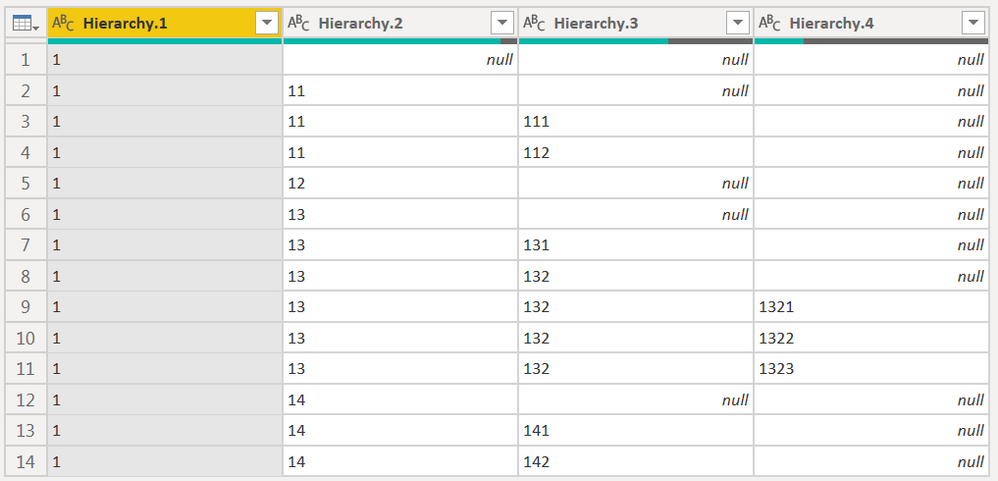
First of all, you should import or compile from HR or whatever system a fundamental table,
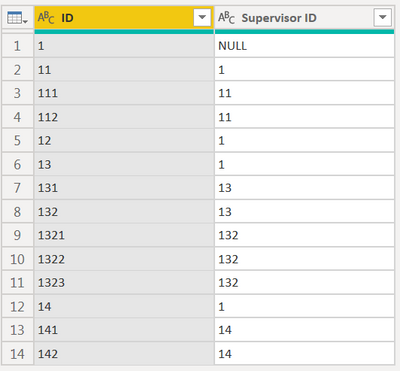
CNENFRNL_0-1652784452346.png

let
    RecursiveHierarchy = (_supID as text, _hierarchy as list) as list => let pos = List.PositionOf(Cols{0}, _supID) in if pos<>-1 then @RecursiveHierarchy(Cols{1}{pos}, {_supID} & _hierarchy) else _hierarchy,
    Source = Table.FromRows(Json.Document(Binary.Decompress(Binary.FromText("VcwxDgAgCAPAvzC7WHiGcXMi/v8bKmLArRdaVKlSoT5ao1k2jqpHyw9IQJQ4ReuzAx/uCY/4yZkSH8Vm4oBjLg==", BinaryEncoding.Base64), Compression.Deflate)), let _t = ((type nullable text) meta [Serialized.Text = true]) in type table [ID = _t, #"Supervisor ID" = _t]),
    Cols = Table.ToColumns(Source),
    #"Added Hierarchy" = Table.AddColumn(Source, "Hierarchy", each Text.Combine(RecursiveHierarchy([#"Supervisor ID"], {}) & {[ID]}, "|")),
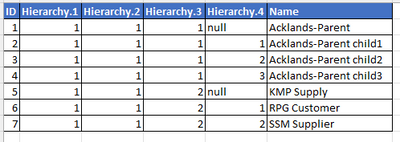
    #"Split Column by Delimiter" = Table.SplitColumn(Table.SelectColumns(#"Added Hierarchy", "Hierarchy"), "Hierarchy", Splitter.SplitTextByDelimiter("|", QuoteStyle.Csv), {"Hierarchy.1", "Hierarchy.2", "Hierarchy.3", "Hierarchy.4"})
in
    #"Split Column by Delimiter"
CNENFRNL_1-1652784567755.png


Thanks to the great efforts by MS engineers to simplify syntax of DAX! Most beginners are SUCCESSFULLY MISLED to think that they could easily master DAX; but it turns out that the intricacy of the most frequently used RANKX() is still way beyond their comprehension!

DAX is simple, but NOT EASY!

That's great news. Thanks for your detailed explaination. 

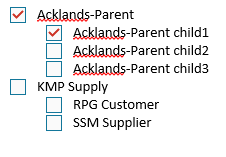
To display to user, can we show different column (another column) instead of hierarchy id's.

kmpmuthu_0-1652890280338.png


kmpmuthu_1-1652890280348.png


Appreciate if you could provide any solution for this. Thanks in Advance.

Helpful resources

Announcements
FabCon and SQLCon Barcelona 2026

FabCon & SQLCon – Barcelona 2026

Join us in Barcelona for FabCon and SQLCon, the Fabric, Power BI, SQL, and AI community event. Save €200 with code FABCMTY200.

60 days of Data Days Carousel

Data Days 2026

Join Fabric Data Days 2026: 60 days of free live/on-demand sessions, challenges, study groups, and certification opportunities.

Power BI DataViz World Championships carousel

Power BI DataViz World Championships - June 2026

A new Power BI DataViz World Championship is coming this June! Don't miss out on submitting your entry.