FabCon is coming to Atlanta
Join us at FabCon Atlanta from March 16 - 20, 2026, for the ultimate Fabric, Power BI, AI and SQL community-led event. Save $200 with code FABCOMM.
Register now!- Power BI forums
- Get Help with Power BI
- Desktop
- Service
- Report Server
- Power Query
- Mobile Apps
- Developer
- DAX Commands and Tips
- Custom Visuals Development Discussion
- Health and Life Sciences
- Power BI Spanish forums
- Translated Spanish Desktop
- Training and Consulting
- Instructor Led Training
- Dashboard in a Day for Women, by Women
- Galleries
- Data Stories Gallery
- Themes Gallery
- Contests Gallery
- Quick Measures Gallery
- Notebook Gallery
- Translytical Task Flow Gallery
- TMDL Gallery
- R Script Showcase
- Webinars and Video Gallery
- Ideas
- Custom Visuals Ideas (read-only)
- Issues
- Issues
- Events
- Upcoming Events
To celebrate FabCon Vienna, we are offering 50% off select exams. Ends October 3rd. Request your discount now.
- Power BI forums
- Forums
- Get Help with Power BI
- Desktop
- Re: How to sum the values of a measure in DAX?
- Subscribe to RSS Feed
- Mark Topic as New
- Mark Topic as Read
- Float this Topic for Current User
- Bookmark
- Subscribe
- Printer Friendly Page

- Mark as New
- Bookmark
- Subscribe
- Mute
- Subscribe to RSS Feed
- Permalink
- Report Inappropriate Content
How to sum the values of a measure in DAX?
Dear All,
I do have a simple matrix in Power BI, where the values are taken from a measure. See below screenshot:
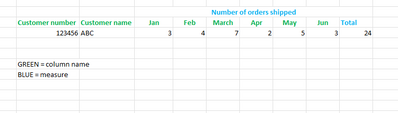
I want to create the column 'Total' with a DAX function as measure, too.
Question: how can I create a new measure which is a sum of the values in the measure number of orders shipped? (ranging from Jan to June in this example). Since this isn't column name / field, I cannot use for example the formula:
CALCULATE(SUM(table[number of orders shipped], ALL(table))
Any suggestion is welcome
Kind regards,
Solved! Go to Solution.


- Mark as New
- Bookmark
- Subscribe
- Mute
- Subscribe to RSS Feed
- Permalink
- Report Inappropriate Content
Hi @Anonymous ,
You need to create virtual table via SUMMARIZE() in measure to do that.
Total =
VAR _s =
    SUMMARIZE (
        'Table',
        [customer number],
        [customer name],
        date[month],
        "v_Number of orders shipped", [number of orders shipped]
    )
RETURN
    SUMX ( _s, [v_Number of orders shipped] )
Result:
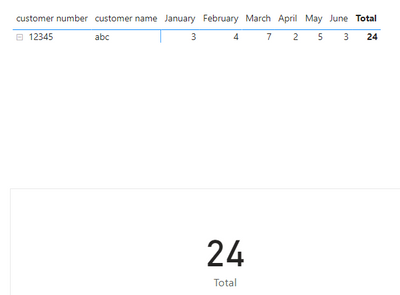
If i missunderstood you, please let me know.
Pbix in the end you can refer.
Best Regards
Community Support Team _ chenwu zhu
If this post helps, then please consider Accept it as the solution to help the other members find it more quickly.
- Mark as New
- Bookmark
- Subscribe
- Mute
- Subscribe to RSS Feed
- Permalink
- Report Inappropriate Content
Hi @Anonymous ,
You need to create virtual table via SUMMARIZE() in measure to do that.
Total =
VAR _s =
    SUMMARIZE (
        'Table',
        [customer number],
        [customer name],
        date[month],
        "v_Number of orders shipped", [number of orders shipped]
    )
RETURN
    SUMX ( _s, [v_Number of orders shipped] )
Result:
If i missunderstood you, please let me know.
Pbix in the end you can refer.
Best Regards
Community Support Team _ chenwu zhu
If this post helps, then please consider Accept it as the solution to help the other members find it more quickly.


- Mark as New
- Bookmark
- Subscribe
- Mute
- Subscribe to RSS Feed
- Permalink
- Report Inappropriate Content
Hi @Anonymous ,
You can try using CALCULATE( SUMX(Table,[number of orders shipped]), ALLEXCEPT(table,table'customer number'))
- Mark as New
- Bookmark
- Subscribe
- Mute
- Subscribe to RSS Feed
- Permalink
- Report Inappropriate Content
Thanks for this suggestion, but I am still struggling with the fact that Number of orders shipped is not a field name in table, but just a measure. The SUM or SUMX function does not work.
- Mark as New
- Bookmark
- Subscribe
- Mute
- Subscribe to RSS Feed
- Permalink
- Report Inappropriate Content
Hi @Anonymous ,
Assuming that you need the total of Number of orders shipped for each customer , you can try using below formula -
CALCULATE(SUM(table[number of orders shipped], ALLEXCEPT(table,table'customer number'))
Please accept the solution if this answers your query.
Thanks!
Avantika
- Mark as New
- Bookmark
- Subscribe
- Mute
- Subscribe to RSS Feed
- Permalink
- Report Inappropriate Content
Thanks for your feedback and correctly understood regarding the number of orders shipped by customer number is required.
There is a challenge on the field Number of order shipped. It's not a field name in a table. It's a measure and there I cannot execute the first part of the formula (CALCULATE(SUM(table[number of orders shipped].......)
I am seeking for an alternative.
Thanks for any additional suggestion.
Kind regards,
Helpful resources

Power BI Monthly Update - September 2025
Check out the September 2025 Power BI update to learn about new features.

Fabric Community Update - August 2025
Find out what's new and trending in the Fabric community.


