cancel
Showing results for 
Search instead for 
Did you mean: 

Data Days is here! Join us now for 60+ days of learning, challenges, and connection. Learn more

Reply
TomsNg
Helper I
Helper I

How to show all data point in Y axis of a scatter chart in Power BI Desktop

Hi Experts,


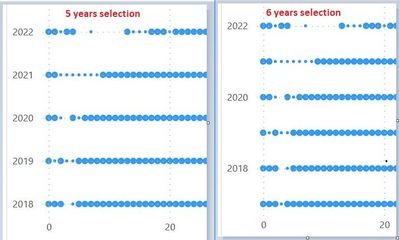
We have a scatter chart for showing the publication count by years. It is found that when 5 consecutive years is chosen, all the years are shown in the Y axis properly, however, once 6 consecutive years is chosen, only the even years are shown in the Y axis. Is it possible to show all the years in Y axis no matter it is 5 or 6 consecutive years?


Thanks


Toms

5n6YearSelection.jpg

3 REPLIES 3
mahenkj2
Solution Sage
Solution Sage

Hi @TomsNg 


Scatter chart is used to show relation between two numerical values. If you convert one of the axis to categorical, that axis acts like a text axis and then sctatter chart can not be used.


I would recommend to go for a 'Dot plot charts'.

https://learn.microsoft.com/en-us/power-bi/visuals/power-bi-visualization-scatter?tabs=powerbi-deskt...


Hope it helps.


amitchandak
Super User
Super User

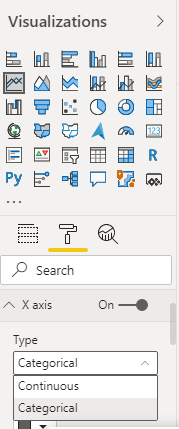
@TomsNg , Make the Axis type Categorical 


Axis_type.png

Share with Power BI Enthusiasts: Full Power BI Video (20 Hours) YouTube
Microsoft Fabric Series 60+ Videos YouTube
Microsoft Fabric Hindi End to End YouTube

Hello amitchandak,


Thanks for your reply, however, it doesn't work. An error of "If your x-axis is categorical, choose a summarization for the x- or y-axis." is returned.

For your information, in our scatter chart, the Y-axis is pointing to a column named 'Publication Year' and 'Don't summarize' is chosen, the X-axis is pointing to an numeric column named 'pub_count' and 'Don't summarize' is also chosen. We just want to show every count of publication by publication year. The only problem now is it failed to show all publication years in the Y axis.


Thanks


Toms


Helpful resources

Announcements
Fabric Data Days is here Carousel

Fabric Data Days 2026

Don't miss out on Data Days, June 15 through August 7. Learn Fabric, Power BI, SQL, AI and more.

May Power BI Update Carousel

Power BI Monthly Update - May 2026

Check out the May 2026 Power BI update to learn about new features.

Power BI DataViz World Championships carousel

Power BI DataViz World Championships - June 2026

A new Power BI DataViz World Championship is coming this June! Don't miss out on submitting your entry.