cancel
Showing results for 
Search instead for 
Did you mean: 

The Power BI Data Visualization World Championships is back! Get ahead of the game and start preparing now! Learn more

Reply
konradjonsson
Helper II
Helper II

How to resolve ambiguous relationship

Hi.

I have run into a problem with ambiguous relationships. 


What I want:

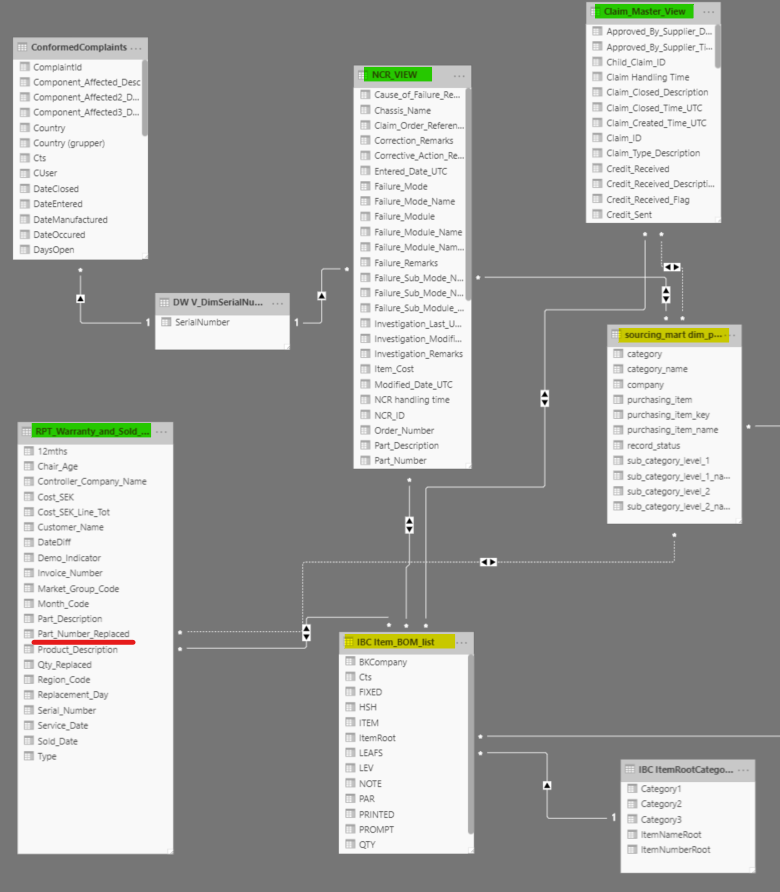
-I have three transaction tables (highlighted in green)

-each of these tables include the field 'Part number replaced' (underlined in red)

-I have two index tables (highlighted in yellow), where the part numbers are categorized

-the categorizations in the two tables are different and used for different purposed, i.e. I need both
Community question - ambigious relationships.png

The issue I run into is:

-I have relationships set up and working for the 'IBC Item BOM list' (yellow)

-I also have relationship set up for 'NCR View' (green) and 'sourcing mart dim...' (yellow)

-so, for 'NCR View', I get what I want - i.e. a categorization based on both index tables.

-when I try to create relationships between the other two transaction tables ('RPT Warranty...', 'Claim Master...') and the other index table, 'sourcing mart dim...' (yellow), I get the error message that such relationship would introduce ambiguity between other tables.

1 ACCEPTED SOLUTION
tex628
Community Champion
Community Champion

Hello Konrad, 

The issue here is due to the double sided crossfilter directions. 

As an example,

If you place a filter on IBC_Item_BOM_List it it will filter RPT_Warranty_and_sold
If RPT_Warranty_and_sold is filtered it will then filter Sourcing_mart dim.
Sourcing_mart dim will then filter Claim_Master_View.
And finally Claim_Master_View filters IBC_Item_BOM_List.

So the result is that placing a filter on IBC_Item_BOM_List creates a situation where the tables tries to filter itself, which doesn't work too well. 

If you change the direction of the crossfilter so that they are one-sided you should be able to create the relationship. 

Br,
Johannes


Connect on LinkedIn

View solution in original post

2 REPLIES 2
tex628
Community Champion
Community Champion

Hello Konrad, 

The issue here is due to the double sided crossfilter directions. 

As an example,

If you place a filter on IBC_Item_BOM_List it it will filter RPT_Warranty_and_sold
If RPT_Warranty_and_sold is filtered it will then filter Sourcing_mart dim.
Sourcing_mart dim will then filter Claim_Master_View.
And finally Claim_Master_View filters IBC_Item_BOM_List.

So the result is that placing a filter on IBC_Item_BOM_List creates a situation where the tables tries to filter itself, which doesn't work too well. 

If you change the direction of the crossfilter so that they are one-sided you should be able to create the relationship. 

Br,
Johannes


Connect on LinkedIn

Thank you Johannes!

It worked.

When I changed the filter direction (to single), I consistently used "Index table filters Transaction table". (not sure what impact the direction has, but I am happy:-))

Helpful resources

Announcements
November Power BI Update Carousel

Power BI Monthly Update - November 2025

Check out the November 2025 Power BI update to learn about new features.

Fabric Data Days Carousel

Fabric Data Days

Advance your Data & AI career with 50 days of live learning, contests, hands-on challenges, study groups & certifications and more!

FabCon Atlanta 2026 carousel

FabCon Atlanta 2026

Join us at FabCon Atlanta, March 16-20, for the ultimate Fabric, Power BI, AI and SQL community-led event. Save $200 with code FABCOMM.

Top Solution Authors
Top Kudoed Authors