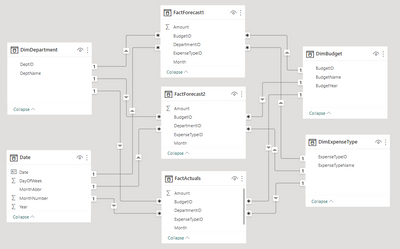
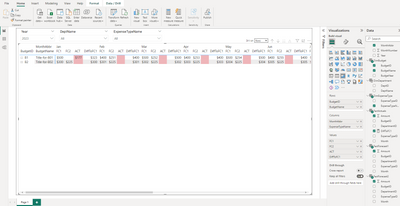
I am generating a matrix/table showing monthly actuals compared to two financial forecasts. I need to conditionally format the backround color in scenarios where the ACTUALS are off by +/- 100. I have a few dimension tables and 3 fact tables.
Within my FactActuals table, I created a simple measure to calculate the difference between the actuals and forecast1:
DiffToFC1 = SUM(FactForecast1[Amount])-sum(FactActuals[Amount])
The conditional background rules are:

This works except the formatting pushes out into the future for months that have not occurred... for which I would never have actuals. I am uncertain how and where to indicate "current month" so conditional formatting can be applied correctly. It can be pulled or inferred from my source data but I don't know how to leverage it.
Main Question: How to model "current month" and reference it in conditional background calculations for matrix visualization values so future months are ignored? Null/Blank values in past should be considered zero for the purpose of styling... while null/bank values in future are ignored.
Secondary questions due to me being new to PowerBI:
- Is my model appropriately structured to support this visualization? I had considered building a single massive fact table.
- Is a matrix the best visualization in this scenarion or should I model a flat table? I do not need row grouping, only columns group by month/forecast/actual
- How do I prevent the year slicer from exceeding the number years found in the fact tables? The fact and DimBudget tables have years 2022-2023, but the DimDate table has 2024 and is shown in slicer)
- Is there a better mechanism to "show zeros" instead of blanks? I have seen recommendations to create measures that add 0 but that results in additional rows shown in the matrix... (i.e., all previous budget years rather than the currently filtered)