cancel
Showing results for 
Search instead for 
Did you mean: 

Get Fabric Certified for FREE during Fabric Data Days. Don't miss your chance! Request now

Reply
roshak
Frequent Visitor

How to model "current month" so conditional formats are ignored in future months of Matrix Visual

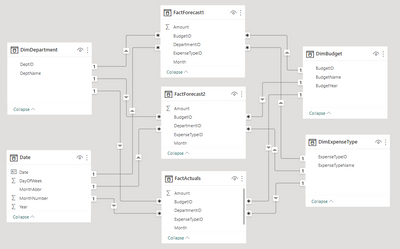
I am generating a matrix/table showing monthly actuals compared to two financial forecasts.  I need to conditionally format the backround color in scenarios where the ACTUALS are off by +/- 100.  I have a few dimension tables and 3 fact tables.
 
roshak_0-1677166958788.png


Within my FactActuals table, I created a simple measure to calculate the difference between the actuals and forecast1:
 DiffToFC1 = SUM(FactForecast1[Amount])-sum(FactActuals[Amount])
The conditional background rules are:
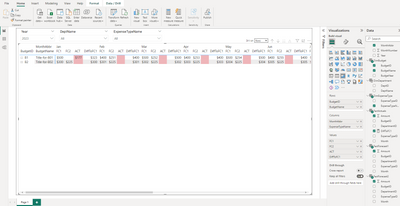
roshak_0-1677169392049.png


This works except the formatting pushes out into the future for months that have not occurred... for which I would never have actuals. I am uncertain how and where to indicate "current month" so conditional formatting can be applied correctly.  It can be pulled or inferred from my source data but I don't know how to leverage it.

roshak_1-1677167141358.png
 

Main Question: How to model "current month" and reference it in conditional background calculations for matrix visualization values so future months are ignored?  Null/Blank values in past should be considered zero for the purpose of styling... while null/bank values in future are ignored.
 

Secondary questions due to me being new to PowerBI:
  1. Is my model appropriately structured to support this visualization?  I had considered building a single massive fact table.
  2. Is a matrix the best visualization in this scenarion or should I model a flat table?  I do not need row grouping, only columns group by month/forecast/actual
  3. How do I prevent the year slicer from exceeding the number years found in the fact tables? The fact and DimBudget tables have years 2022-2023, but the DimDate table has 2024 and is shown in slicer)
  4. Is there a better mechanism to "show zeros" instead of blanks?  I have seen recommendations to create measures that add 0 but that results in additional rows shown in the matrix... (i.e., all previous budget years rather than the currently filtered)  
3 REPLIES 3
amitchandak
Super User
Super User

@roshak , you can create a color measure and use that in conditional formatting using field value option


example

DiffToFC1 = Switch(True() ,
eomonth(max(Date[Date]),0) = eomonth(today(),0) && SUM(FactForecast1[Amount])-sum(FactActuals[Amount])<0 , "red",
eomonth(max(Date[Date]),0) = eomonth(today(),0) && SUM(FactForecast1[Amount])-sum(FactActuals[Amount]) >0 , "Blue",
"Pink")


How to do conditional formatting by measure and apply it on pie?
https://www.youtube.com/watch?v=RqBb5eBf_I4&list=PLPaNVDMhUXGYo50Ajmr4SgSV9HIQLxc8L
https://community.powerbi.com/t5/Community-Blog/Power-BI-Conditional-formatting-the-Pie-Visual/ba-p/...
https://amitchandak.medium.com/power-bi-where-is-the-conditional-formatting-option-in-new-format-pan...

Share with Power BI Enthusiasts: Full Power BI Video (20 Hours) YouTube
Microsoft Fabric Series 60+ Videos YouTube
Microsoft Fabric Hindi End to End YouTube

That approach works if I am able to use TODAY() as the comparator.  However, my "current month" is a static value that exists in my data.  Do you have a recommendation on how to store/reference that value?

That looks promising and I'll give it a try.  However, my "current month" is a value from my data , not the actual date.  I am struggling with how and where to store that info.

Helpful resources

Announcements
November Power BI Update Carousel

Power BI Monthly Update - November 2025

Check out the November 2025 Power BI update to learn about new features.

Fabric Data Days Carousel

Fabric Data Days

Advance your Data & AI career with 50 days of live learning, contests, hands-on challenges, study groups & certifications and more!

FabCon Atlanta 2026 carousel

FabCon Atlanta 2026

Join us at FabCon Atlanta, March 16-20, for the ultimate Fabric, Power BI, AI and SQL community-led event. Save $200 with code FABCOMM.

Top Solution Authors
Top Kudoed Authors