Join us at FabCon Atlanta from March 16 - 20, 2026, for the ultimate Fabric, Power BI, AI and SQL community-led event. Save $200 with code FABCOMM.
Register now!Learn from the best! Meet the four finalists headed to the FINALS of the Power BI Dataviz World Championships! Register now
Hi Leaders,
I am new to Power BI, I am struggling to implement RLS for last few weeks. I am not sure how to proceed with my scenario, please someone help me to give me idea to implement my scenario. its great help.
here is my requirement.
My tables are:
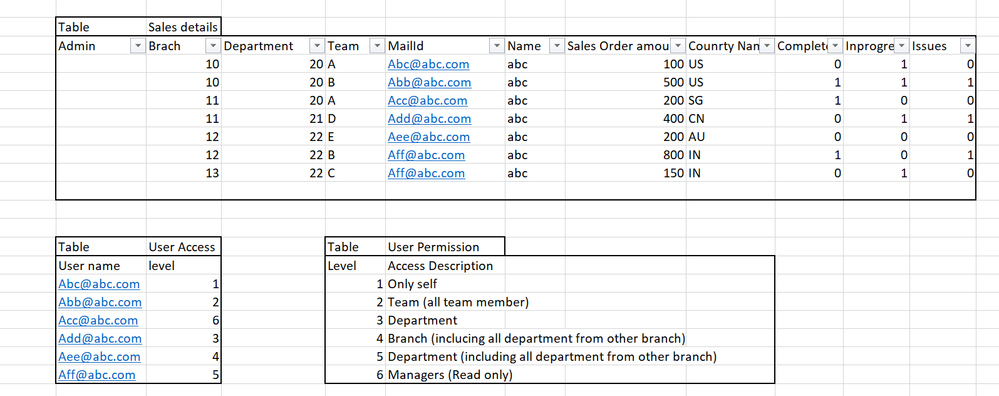
Report 1 and 2 will change based on the user login and permission level ('User Access' and 'User Permission'.). if am team head then i can see all team progress in summary view and if i am login with branch head then i can see all department and team progress.
Two level of reports
Report 1: summary of all one's from completed, in progress and issues. User click on the number then the
Report 2 will display with those related values based on the 'User Access' and 'User Permission'.
Thanks a lot for your idea and help.
Solved! Go to Solution.
@SathiMathi,
Please create Hierarchy path according to the user permisson level, then apply RLS on the hierarchy following the guide in the following blogs.
Dynamic Row Level Security with Organizational Hierarchy Power BI
Power BI Tutorial: Row Level Security on Parent Child Hierarchy
Regards,
Lydia
@SathiMathi,
Please create Hierarchy path according to the user permisson level, then apply RLS on the hierarchy following the guide in the following blogs.
Dynamic Row Level Security with Organizational Hierarchy Power BI
Power BI Tutorial: Row Level Security on Parent Child Hierarchy
Regards,
Lydia
Share feedback directly with Fabric product managers, participate in targeted research studies and influence the Fabric roadmap.
Check out the February 2026 Power BI update to learn about new features.
| User | Count |
|---|---|
| 61 | |
| 54 | |
| 41 | |
| 17 | |
| 13 |
| User | Count |
|---|---|
| 106 | |
| 99 | |
| 38 | |
| 29 | |
| 28 |