This time we’re going bigger than ever. Fabric, Power BI, SQL, AI and more. We're covering it all. You won't want to miss it.
Learn moreLevel up your Power BI skills this month - build one visual each week and tell better stories with data! Get started
Hi All,
In power bi I am trying to build the visualization in matrix, but do not see options to achieve the same.
Can someone help with the approach?
@Anonymousthank you for your kind reply,
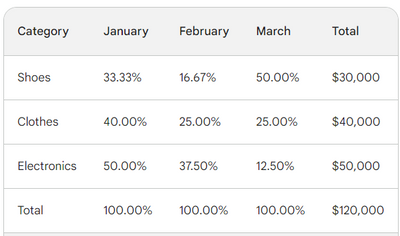
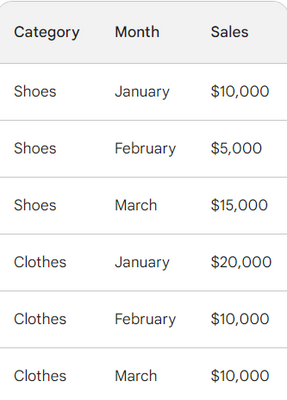
So I am having the below data set, which I am trying to get the sales by every month for every category, and in the rows the % values every month of the sum total for that category
raw data as below:
Total = Sum(Sales)
Montly % Values = DIVIDE(SUM([Sales]), CALCULATE([SUM([Sales]), ALL([Category], [Month])])) * 100
Hi @naren_palmure ,
In order to better understand your demands and give the right solution, could you please provide some more specific information? such as your desensitized example data and a screenshot of your desired results?
Thanks for your efforts & time in advance.
Best regards,
Community Support Team_Binbin Yu
If this post helps, then please consider Accept it as the solution to help the other members find it more quickly.
Check out the April 2026 Power BI update to learn about new features.
Sign up to receive a private message when registration opens and key events begin.
If you have recently started exploring Fabric, we'd love to hear how it's going. Your feedback can help with product improvements.
| User | Count |
|---|---|
| 38 | |
| 29 | |
| 28 | |
| 20 | |
| 18 |
| User | Count |
|---|---|
| 66 | |
| 36 | |
| 30 | |
| 25 | |
| 24 |