Get certified for free when you join Fabric Data Days 2026 and dive into Fabric, Power BI, SQL, AI, and other essential data skills.
Join nowJuly 7 - July 17 | Round 2 of the Power BI Dataviz World Championships. Don't miss your chance! Learn more
Hi Power Bi community !
I'm dealing with a problem today but i don't have any issue. Indeed I want to know how to get data from SQL Server from an external server in Power Bi Desktop. Do I enter the Ip adress in the server name ? or IPADRESS:ServerName ? If not where I have to mention th ip adress ?
Thanks in advance,
Ghislain
Solved! Go to Solution.
Hi @Ghislain,
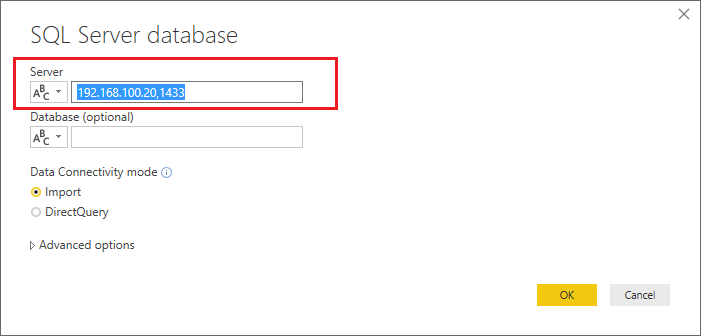
I just verified that I can connect successfully to one of my remote SQL Server by IP address with my Power BI Desktop. I'm using (IP,Port) for the Server field in Power BI Desktop.![]()
Regards
Hi @Ghislain,
I just verified that I can connect successfully to one of my remote SQL Server by IP address with my Power BI Desktop. I'm using (IP,Port) for the Server field in Power BI Desktop.![]()
Regards
Hi, Woww.. I am also searing for the same. Is it applicable for MySQL too? Our production date tables stored in MySQL server and comes like .php.
Thx I find it in Sql Server Config !!!
Join us in Barcelona for FabCon and SQLCon, the Fabric, Power BI, SQL, and AI community event. Save €200 with code FABCMTY200.
Join Fabric Data Days 2026: 60 days of free live/on-demand sessions, challenges, study groups, and certification opportunities.
| User | Count |
|---|---|
| 23 | |
| 22 | |
| 18 | |
| 17 | |
| 13 |
| User | Count |
|---|---|
| 63 | |
| 44 | |
| 42 | |
| 40 | |
| 40 |