cancel
Showing results for 
Search instead for 
Did you mean: 

The Power BI Data Visualization World Championships is back! Get ahead of the game and start preparing now! Learn more

Reply
Anonymous
Not applicable

How to create a chart with two X-axis because I have two time lines

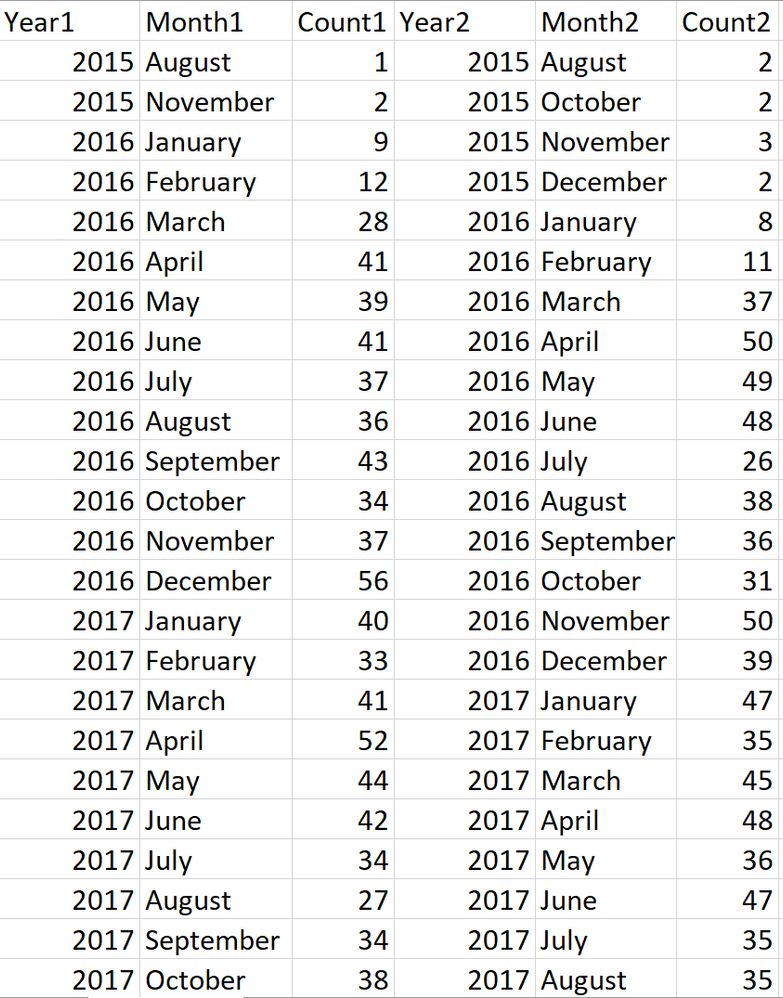
I need to build a chart, but the values are based on two timelines.

In this case, if I need to build one chart with these two values I need to find a chart which is able to accomondate two X-axis.

WeChat Image_20191001120937.png

I know I can overlap two charts, but if there is a way to do that in one chart.

Also, I know I am able to fix it manually by make it to the same time line, but it will cost me a plenty of time in the future.


1 REPLY 1
Anonymous
Not applicable

Hello-


   I think your best solution is going to be going into PowerQuery and merging these based on your date.  Then expand just the count column.  That way you can compare your measure based on the same date, rather than multiple axes.


Jared

Helpful resources

Announcements
Power BI DataViz World Championships

Power BI Dataviz World Championships

The Power BI Data Visualization World Championships is back! Get ahead of the game and start preparing now!

November Power BI Update Carousel

Power BI Monthly Update - November 2025

Check out the November 2025 Power BI update to learn about new features.

FabCon Atlanta 2026 carousel

FabCon Atlanta 2026

Join us at FabCon Atlanta, March 16-20, for the ultimate Fabric, Power BI, AI and SQL community-led event. Save $200 with code FABCOMM.