cancel
Showing results for 
Search instead for 
Did you mean: 

We've captured the moments from FabCon & SQLCon that everyone is talking about, and we are bringing them to the community, live and on-demand. Starts on April 14th. Register now

Reply
S2861926
Regular Visitor

How to correlate more rows in the same table with unique ID

Hi,

in a table (SQL database) I have the double-entry bookkeeping (accounting movements) as shown in the attached figure:

Immagine 2021-11-15 150255.png


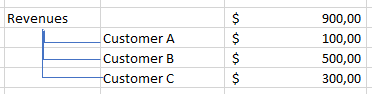
I want to correlate all the movements on the basis of the "registration ID" column (column A), in order to understand which customers have determined my revenues. I try to report another figure to make you understand what I mean:

Immagine 2021-11-15 150518.png


It's possible to to that with Power BI?

thx


6 REPLIES 6
Anonymous
Not applicable

HI @S2861926,

It seems like you want to use the customer code to register with all movements descriptions, then you can simply summary these records with specific customers.

If that is the case, I'd like to suggest you create a calculated column to loop records based on the current 'registration ID' group to find out the corresponding user to tag these records.

User =
CALCULATE (
    CONCATENATEX ( VALUES ( 'Table'[Description] ), [Description], "," ),
    FILTER (
        'Table',
        'Table'[Registration ID] = EARLIER ( 'Table'[registration ID] )
            && SEARCH ( "33.05.11", 'Table'[Account Code], 1, -1 ) > 0
    )
)

Regards,

Xiaoxin Sheng

S2861926
Regular Visitor

I had thought about creating a "dimension table" but I would like a model that is always updated automatically ... let me explain.
If I create a pivot table with "Registration ID" and "Customer Name" it can be fine for the data I'm working on now, but tomorrow, for example by increasing the number of registrations (Reg.ID) or new customers (Customer Name) I should always recreate a new table to import into my "dimension table". I would like a system that automatically updates itself starting from the data contained in my SQL server ...
I had tried (with poor results)

So doesn't have to be static you can make a dynamic table ,a portion of your current query/table  , something like this:


Select Distict Registration ID, Customer Name,

from Table

;


sorry but i can't understand what you mean ... could you be more specific?

Anonymous
Not applicable

Hi @S2861926,

I mean you can add a calculated column to store the customer that extract from each registration ID group.

Then you can use this field to create a table visual with the above field and 'debit' and 'credit' fields.

For the displayed value type, you can add a filter with the 'description' field to control which one is displayed on the visual.

Regards,

Xiaoxin Sheng

NilR
Post Patron
Post Patron

I would create a dimension table with the Registration ID and Customer Name. Then Join on the back End or create relationship in the front end.

Helpful resources

Announcements
New to Fabric survey Carousel

New to Fabric Survey

If you have recently started exploring Fabric, we'd love to hear how it's going. Your feedback can help with product improvements.

Power BI DataViz World Championships carousel

Power BI DataViz World Championships - June 2026

A new Power BI DataViz World Championship is coming this June! Don't miss out on submitting your entry.

Join our Fabric User Panel

Join our Fabric User Panel

Share feedback directly with Fabric product managers, participate in targeted research studies and influence the Fabric roadmap.

March Power BI Update Carousel

Power BI Community Update - March 2026

Check out the March 2026 Power BI update to learn about new features.