Hello everyone!
First of all I'd like to thank everyone participating into this community and helping each other out. I oftenly come by and find solutions in no time.
I've an issue calculating time length in "hh:mm" format between two columns where Column A shows the date/time of the event start and Column B shows the date/time of finish. Let me put in another words... Thinking about a helpdesk event where the client opened a ticket on a monday at 08:00 am and the technician solved his problem at 11:30 am the same day, so the total time length between "Start" to "Finish" is 03:30 in "hh:mm".
In addition, I need to consider just the working hours of the company in the formula, so... working hours are from 08h00 to 12h00 and from 13h00 to 17h00 (24 hour clock) and from Monday to Friday.
Keeping this in mind I bring the following table where the column E is the expected result.
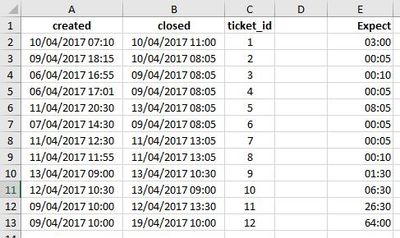
Thank you!
Diego


