Here is an example based on my data table..
| Date | Value1 | Value2 | Value3 | Value4 |
| 1/1/2017 | 84 | 96 | 2.772 | 3.9 |
| 1/2/2017 | 100 | 98 | 3.3 | 4.6 |
| 1/3/2017 | 93 | 89 | 3.069 | 4.3 |
| 1/4/2017 | 94 | 90 | 3.102 | 4.3 |
| 1/5/2017 | 89 | 84 | 2.937 | 4.1 |
| 1/6/2017 | 98 | 93 | 3.234 | 4.5 |
| 1/7/2017 | 82 | 82 | 2.706 | 3.8 |
| 1/8/2017 | 98 | 98 | 3.234 | 4.5 |
| 1/9/2017 | 92 | 97 | 3.036 | 4.2 |
| 1/10/2017 | 93 | 86 | 3.069 | 4.3 |
| 1/11/2017 | 91 | 85 | 3.003 | 4.2 |
| 1/12/2017 | 100 | 95 | 3.3 | 4.6 |
here is the expected output graph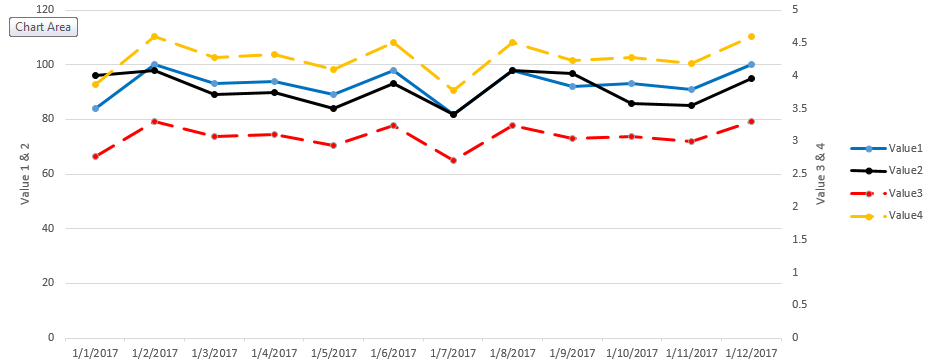
The sample code i had tried to use was very similar to what is in the link above, with minor exceptions. it is pasted below.
*note that in the below code,
i only tried to use "Value1, and Value2" with date - because i was struggling to make it work, and ultimately couldnt.
// Set the dimensions of the canvas / graph
var margin = {top: 30, right: 20, bottom: 30, left: 50},
    width = w - margin.left - margin.right,
    height = h - margin.top - margin.bottom;

// Parse the date / time
var parseDate = d3.time.format("%b %Y").parse;

// Set the ranges
var x = d3.time.scale().range([0, width]);
var y = d3.scale.linear().range([height, 0]);

// Define the axes
var xAxis = d3.svg.axis().scale(x)
    .orient("bottom").ticks(5);

var yAxis = d3.svg.axis().scale(y)
    .orient("left").ticks(5);

// Define the line
var valueline = d3.svg.line()
    .x(function(d) { return x(d.date); })
    .y(function(d) { return y(d.value1); });

// Adds the svg canvas
var svg = d3.select("#chart")
.attr("width", width + margin.left + margin.right)
.attr("height", height + margin.top + margin.bottom)
    .append("g")
        .attr("transform",
              "translate(" + margin.left + "," + margin.top + ")");

// Get the data
pbi.dsv(type, function(data) {
    data.forEach(function(d) {
  d.date = parseDate(d.Date);
  d.value1 = +d.value1;
  d.value2 = +d.value2;
    });

    // Scale the range of the data
    x.domain(d3.extent(data, function(d) { return d.date; }));
    y.domain([0, d3.max(data, function(d) { return d.value1; })]);

    // Nest the entries by symbol
    var dataNest = d3.nest()
        .key(function(d) {return d.symbol;})
        .entries(data);

    // Loop through each symbol / key
    dataNest.forEach(function(d) {

        svg.append("path")
            .attr("class", "line")
            .attr("d", valueline(d.values));

    });

    // Add the X Axis
    svg.append("g")
        .attr("class", "x axis")
        .attr("transform", "translate(0," + height + ")")
        .call(xAxis);

    // Add the Y Axis
    svg.append("g")
        .attr("class", "y axis")
        .call(yAxis);

});


