This is best Fabric, Power BI, SQL and AI community event. How do we know? The last event sold out! Save €200 with code FABCMTY200.
Register nowA new Data Days event is coming soon! This time we’re going bigger than ever. Fabric, Power BI, SQL, AI and more. Don't miss out.
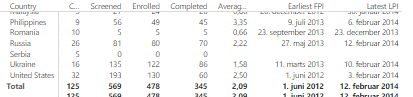
Hi, I have to columns of dates and with the new aggreagted option in the Jan 17 version of powerBI iI was hoping to see some 'levels' in the dates. Especially the time between the First date in column X and the last date in column Y.
Im however struggeling to calcualte the days (months preferebly) between the two columns below ('earlist FPI and Latest LPI'). I have tried the datediff but it returns errors..
Any ideas?
Solved! Go to Solution.
Hello, try with these measures
Diff in Days= DATEDIFF ( FIRSTDATE ( Table2[Date] ), LASTDATE ( Table2[Date] ), DAY )
Diff in Months= DATEDIFF ( FIRSTDATE ( Table2[Date] ), LASTDATE ( Table2[Date] ),MONTH )
What does the error message say?
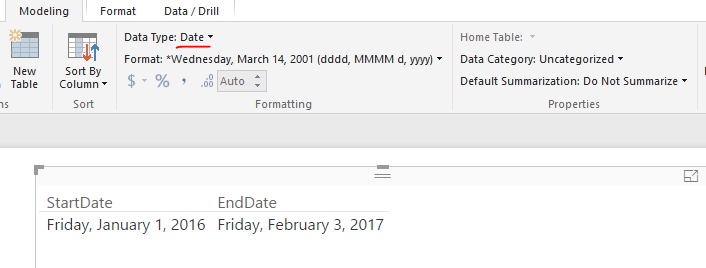
Make sure those two columns are data type, it supposes to work when using DATEDIFF() function.
Regards,
What does the error message say?
Make sure those two columns are data type, it supposes to work when using DATEDIFF() function.
Regards,
Hello, try with these measures
Diff in Days= DATEDIFF ( FIRSTDATE ( Table2[Date] ), LASTDATE ( Table2[Date] ), DAY )
Diff in Months= DATEDIFF ( FIRSTDATE ( Table2[Date] ), LASTDATE ( Table2[Date] ),MONTH )
Perfect! Thanks a lot, it works! 🙂
K
Another poblem I have is that it will not work if I have some empty cells in the columns.
Can I somehow account not to calculate with where there is blank cells?
Kristoffer
Check out the May 2026 Power BI update to learn about new features.
Sign up to receive a private message when registration opens and key events begin.
If you have recently started exploring Fabric, we'd love to hear how it's going. Your feedback can help with product improvements.
| User | Count |
|---|---|
| 30 | |
| 28 | |
| 23 | |
| 19 | |
| 17 |
| User | Count |
|---|---|
| 49 | |
| 47 | |
| 40 | |
| 21 | |
| 18 |