Join us at FabCon Atlanta from March 16 - 20, 2026, for the ultimate Fabric, Power BI, AI and SQL community-led event. Save $200 with code FABCOMM.
Register now!The Power BI Data Visualization World Championships is back! Get ahead of the game and start preparing now! Learn more
Hello Everyone,
I am currently working on developing a dashboard, and I have been trying to calculate the Gross Profit for 2022( Jan-now) vs. the Gross Profit of 2021(Jan-Dec). I have used the following equations to get the right answers: GP 2021 = Calculate([GP Total], Value('Date'[Date]) = 2021), and so for 2022. But I want this to be dynamic. Meaning that when next year comes, the dashboard will show 2022 vs. 2023. I also tried using the Year function: YEAR(TODAY()), but I still hit a roadblock. Your help and guidance are much appreciated and thanks in advance.
Solved! Go to Solution.
Hi @OsamaAhmed ,
Please have a try.
Create a measure.
measure =
VAR _2021 =
CALCULATE (
SUM ( 'Date'[sales] ),
FILTER ( ALL ( 'date' ), YEAR ( 'date'[date] ) = 2021 )
)
VAR _2022 =
CALCULATE (
SUM ( 'Date'[sales] ),
FILTER (
ALL ( 'date' ),
YEAR ( 'date'[date] ) = 2022
&& 'Date'[date] <= TODAY ()
)
)
RETURN
IF (
YEAR ( MAX ( 'Date'[date] ) ) = 2021,
_2021,
IF ( YEAR ( MAX ( 'Date'[date] ) ) = 2022, _2022, BLANK () )
)
If I have misunderstood your meaning, please provide more details with your desired output and your pbix file without privacy information.
Best Regards
Community Support Team _ Polly
If this post helps, then please consider Accept it as the solution to help the other members find it more quickly.
Hi @OsamaAhmed ,
Please have a try.
Create a measure.
measure =
VAR _2021 =
CALCULATE (
SUM ( 'Date'[sales] ),
FILTER ( ALL ( 'date' ), YEAR ( 'date'[date] ) = 2021 )
)
VAR _2022 =
CALCULATE (
SUM ( 'Date'[sales] ),
FILTER (
ALL ( 'date' ),
YEAR ( 'date'[date] ) = 2022
&& 'Date'[date] <= TODAY ()
)
)
RETURN
IF (
YEAR ( MAX ( 'Date'[date] ) ) = 2021,
_2021,
IF ( YEAR ( MAX ( 'Date'[date] ) ) = 2022, _2022, BLANK () )
)
If I have misunderstood your meaning, please provide more details with your desired output and your pbix file without privacy information.
Best Regards
Community Support Team _ Polly
If this post helps, then please consider Accept it as the solution to help the other members find it more quickly.
Thank you @Anonymous, your answer has helped me achieving my desired output
Hi,
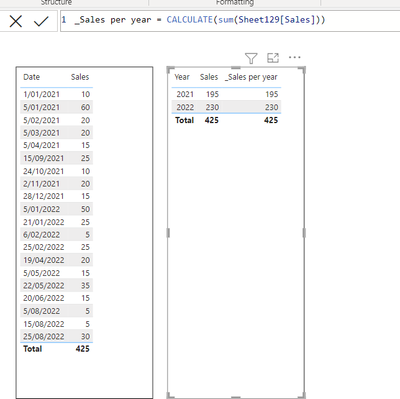
if you have a column that included the Year in your data, just create the sum([GP Total]) measure and then use it in your visual with the Year column :
Appreciate your Kudos
Hi,
If you want to compare the current year's number (even if it is not a full complete year) VS. last full year's number, please try to use the below DAX function. One of ways to achieve this is to use PARALLELPERIOD function.
https://docs.microsoft.com/en-us/dax/parallelperiod-function-dax
I hope this helps to provide some ideas on how to create a solution for your dataset.
The Power BI Data Visualization World Championships is back! Get ahead of the game and start preparing now!
Check out the November 2025 Power BI update to learn about new features.
| User | Count |
|---|---|
| 59 | |
| 46 | |
| 42 | |
| 23 | |
| 17 |
| User | Count |
|---|---|
| 190 | |
| 122 | |
| 96 | |
| 66 | |
| 47 |