cancel
Showing results for 
Search instead for 
Did you mean: 

Get Fabric Certified for FREE during Fabric Data Days. Don't miss your chance! Request now

Reply
Anonymous
Not applicable

How can I drill down from a chart to a table?

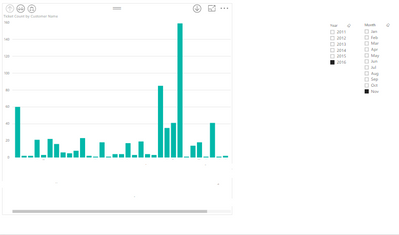
I have created a chart that shows the number of tickets opened by an individual for a period of time. I have created a hierarchy from the individual to include the ticket no., and used this hierarchy in my chart.


What I want to be able to do is drill down into my chart, and see a table listing the ticket numbers, and ideally the status of each ticket (status is a known field).


My chart looks like this;


Capture.PNG


The vertical axis is ticket count. When I drill down on a column I want to be able to list the tickets and their status in a table like ths;


12345 Open

13247 Closed

13299 Closed


Can you do this kind of drill down from one view to another?

5 REPLIES 5
Anonymous
Not applicable

It looks like tjd has the best suggestion as clearly this is not possible (yet). I have voted for this change though, as it would make a real difference to the reports I can generate.


Thanks

Anonymous
Not applicable

Thanks david2. I am not sure if I did quite what you meant, but I right clicked on the chart and chose 'See Data' that shows me the data for that chart. Not what I wanted, but now I think that I am trying to do this the wrong way.


I think another way of expressing what I want is this;


When you drill down on a column, I want a new view(table) filtered by that column. The new table shows different data.

@Anonymous


Currenly, in Power BI Desktop, it's not supported to navigate to another visual or report via Drill Througth (like "go to report" Action in SSRS). Please vote ideas below:


https://ideas.powerbi.com/forums/265200-power-bi-ideas/suggestions/12863445-enable-user-to-navigate-from-one-power-bi-report-t

https://ideas.powerbi.com/forums/265200-power-bi-ideas/suggestions/13715889-drill-to-a-report-page


Regards,

tjd
Impactful Individual

Put a table below your graph that has the fields you want to show and categorize it by your x-axis.  When you then click on one of the columns in the graph, your table will filter to show only those records linked to that column.

david2
Helper I
Helper I

If you click on the Drill tab on the top, you should be able to see a button named "See Records".  This would show you an overview of the data you want to see. But i'm not sure if it's working with this type of visual - give it a shot 🙂

Helpful resources

Announcements
November Power BI Update Carousel

Power BI Monthly Update - November 2025

Check out the November 2025 Power BI update to learn about new features.

Fabric Data Days Carousel

Fabric Data Days

Advance your Data & AI career with 50 days of live learning, contests, hands-on challenges, study groups & certifications and more!

FabCon Atlanta 2026 carousel

FabCon Atlanta 2026

Join us at FabCon Atlanta, March 16-20, for the ultimate Fabric, Power BI, AI and SQL community-led event. Save $200 with code FABCOMM.

Top Solution Authors
Top Kudoed Authors