cancel
Showing results for 
Search instead for 
Did you mean: 

The Power BI Data Visualization World Championships is back! Get ahead of the game and start preparing now! Learn more

Reply
Anonymous
Not applicable

How can I drill down from a chart to a table?

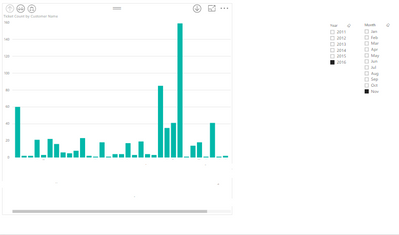
I have created a chart that shows the number of tickets opened by an individual for a period of time. I have created a hierarchy from the individual to include the ticket no., and used this hierarchy in my chart.


What I want to be able to do is drill down into my chart, and see a table listing the ticket numbers, and ideally the status of each ticket (status is a known field).


My chart looks like this;


Capture.PNG


The vertical axis is ticket count. When I drill down on a column I want to be able to list the tickets and their status in a table like ths;


12345 Open

13247 Closed

13299 Closed


Can you do this kind of drill down from one view to another?

5 REPLIES 5
Anonymous
Not applicable

It looks like tjd has the best suggestion as clearly this is not possible (yet). I have voted for this change though, as it would make a real difference to the reports I can generate.


Thanks

Anonymous
Not applicable

Thanks david2. I am not sure if I did quite what you meant, but I right clicked on the chart and chose 'See Data' that shows me the data for that chart. Not what I wanted, but now I think that I am trying to do this the wrong way.


I think another way of expressing what I want is this;


When you drill down on a column, I want a new view(table) filtered by that column. The new table shows different data.

@Anonymous


Currenly, in Power BI Desktop, it's not supported to navigate to another visual or report via Drill Througth (like "go to report" Action in SSRS). Please vote ideas below:


https://ideas.powerbi.com/forums/265200-power-bi-ideas/suggestions/12863445-enable-user-to-navigate-from-one-power-bi-report-t

https://ideas.powerbi.com/forums/265200-power-bi-ideas/suggestions/13715889-drill-to-a-report-page


Regards,

tjd
Impactful Individual

Put a table below your graph that has the fields you want to show and categorize it by your x-axis.  When you then click on one of the columns in the graph, your table will filter to show only those records linked to that column.

david2
Helper I
Helper I

If you click on the Drill tab on the top, you should be able to see a button named "See Records".  This would show you an overview of the data you want to see. But i'm not sure if it's working with this type of visual - give it a shot 🙂

Helpful resources

Announcements
Power BI DataViz World Championships

Power BI Dataviz World Championships

The Power BI Data Visualization World Championships is back! Get ahead of the game and start preparing now!

December 2025 Power BI Update Carousel

Power BI Monthly Update - December 2025

Check out the December 2025 Power BI Holiday Recap!

FabCon Atlanta 2026 carousel

FabCon Atlanta 2026

Join us at FabCon Atlanta, March 16-20, for the ultimate Fabric, Power BI, AI and SQL community-led event. Save $200 with code FABCOMM.