Get certified for free when you join Fabric Data Days 2026 and dive into Fabric, Power BI, SQL, AI, and other essential data skills.
Join nowTry your skills in the Power BI Dataviz World Championship! Round one ends June 26. Join now
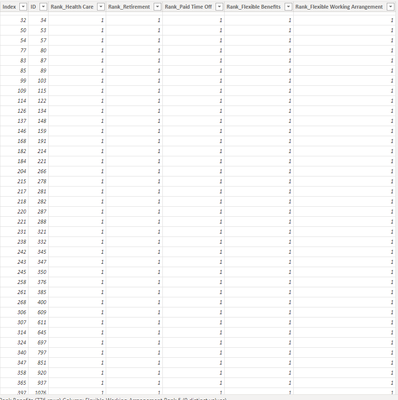
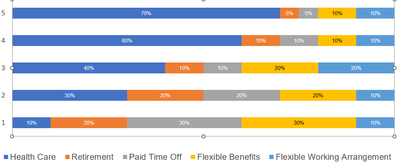
Hi! I wanted to show in report a graph which will present each benefit (health care, pto, retirement, etc.) percentage of rank. Each ID have different answers from 1 to 5 for each benefit.
Wanted to show in the report something like the one below. Like for health care 70% answered 5, etc. etc.
Can anyone help me please 😞
Thank you!
Solved! Go to Solution.
Hi @Anonymous ,
Please find a solution attached. You will need to unpivot your data to normalise it and this should allow you to get the desired chart.
Hope this helps.
Did I help you today? Please accept my solution and hit the Kudos button.
Don't miss out on Data Days, June 15 through August 7. Learn Fabric, Power BI, SQL, AI and more.
Check out the May 2026 Power BI update to learn about new features.
| User | Count |
|---|---|
| 24 | |
| 21 | |
| 20 | |
| 17 | |
| 12 |
| User | Count |
|---|---|
| 64 | |
| 55 | |
| 42 | |
| 38 | |
| 30 |